Snowflake is a cloud data warehouse platform. OpenRouter can stream traces directly to your Snowflake database for custom analytics, long-term storage, and business intelligence.
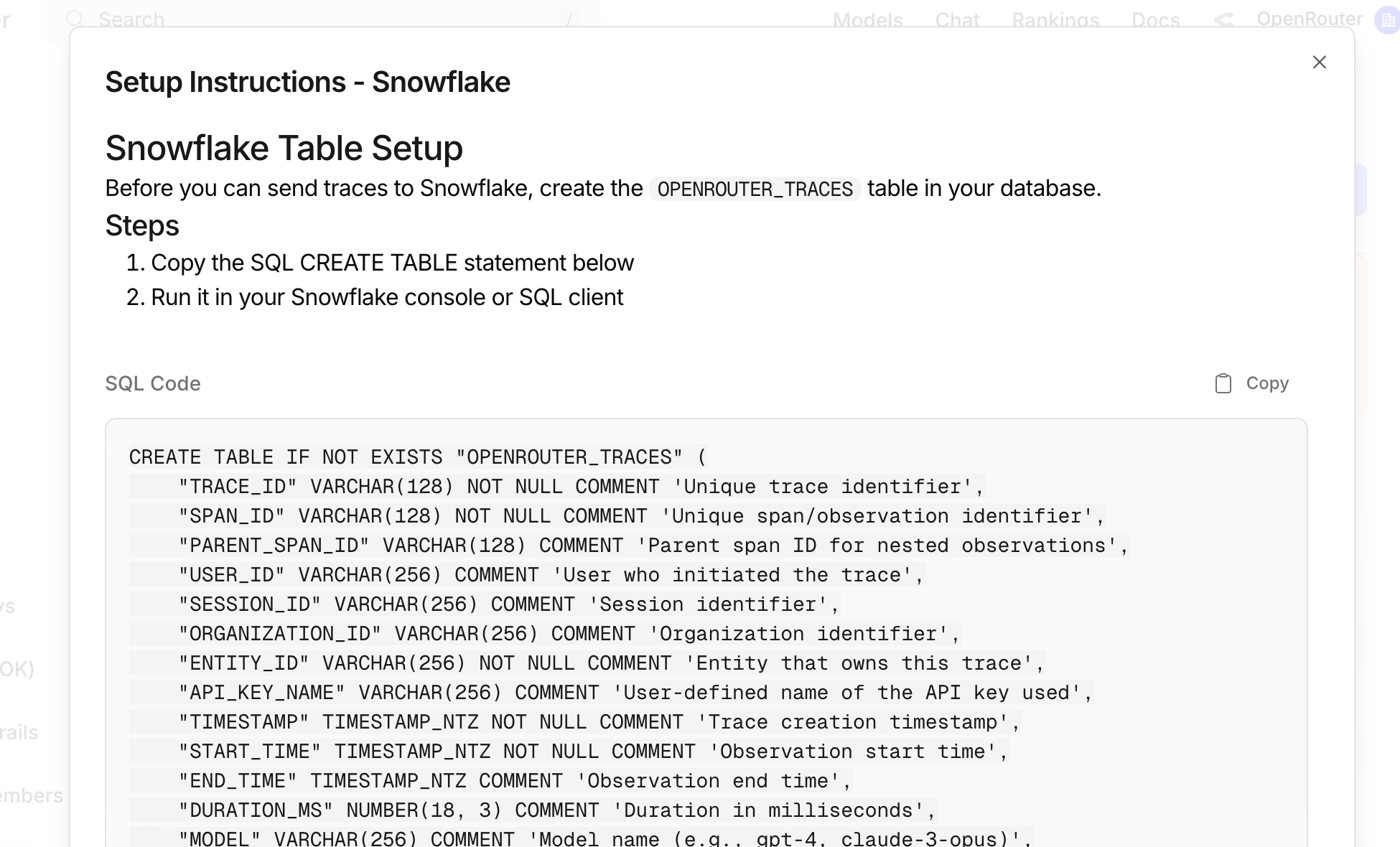
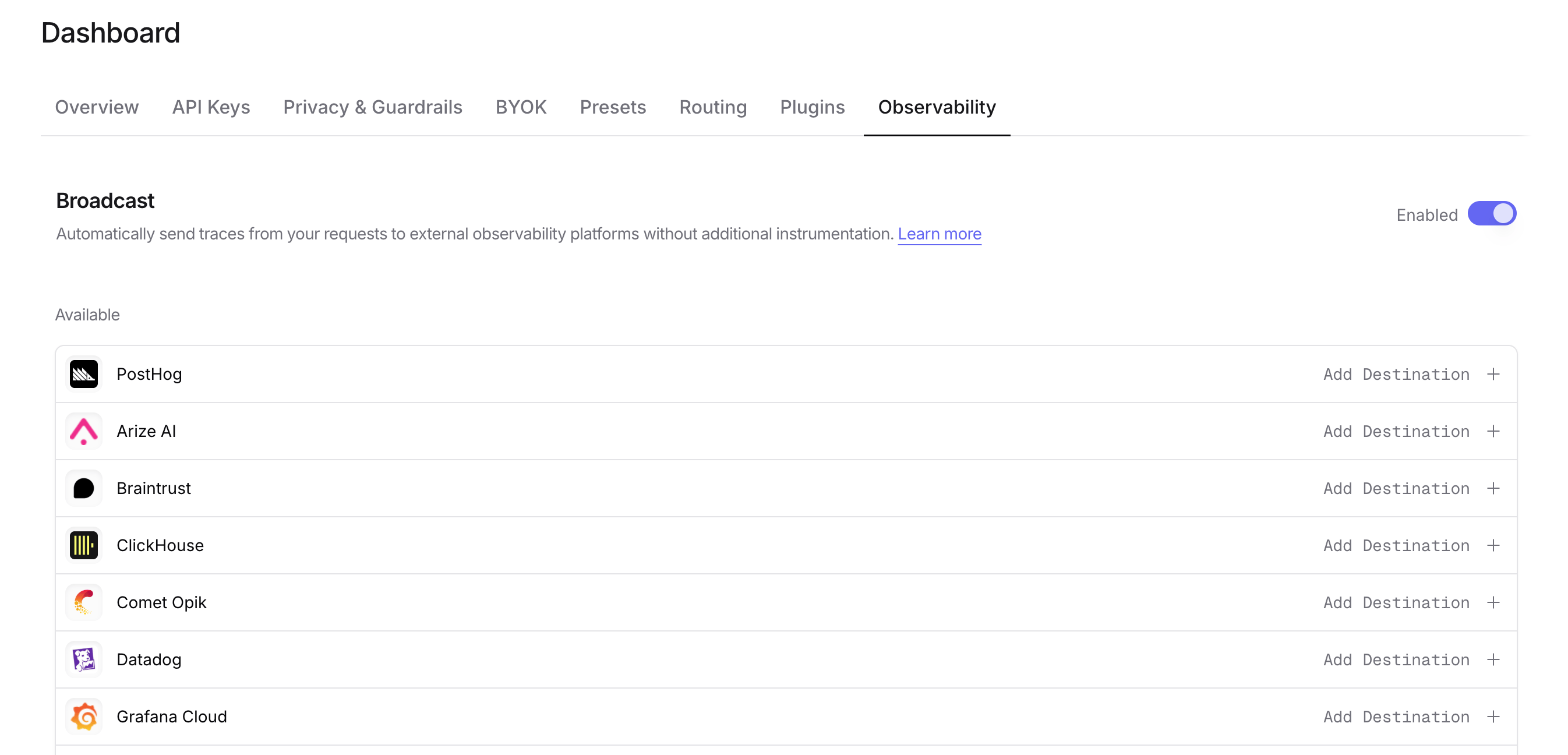
Before connecting OpenRouter, create the OPENROUTER_TRACES table in your Snowflake database. You can find the exact SQL in the OpenRouter dashboard when configuring the destination:
Account: Your Snowflake account identifier (e.g., eac52885.us-east-1). You can find your account region and your account number at the end of your Snowflake instance’s URL: https://app.snowflake.com/us-east-1/eac52885; together these make your account identifier.
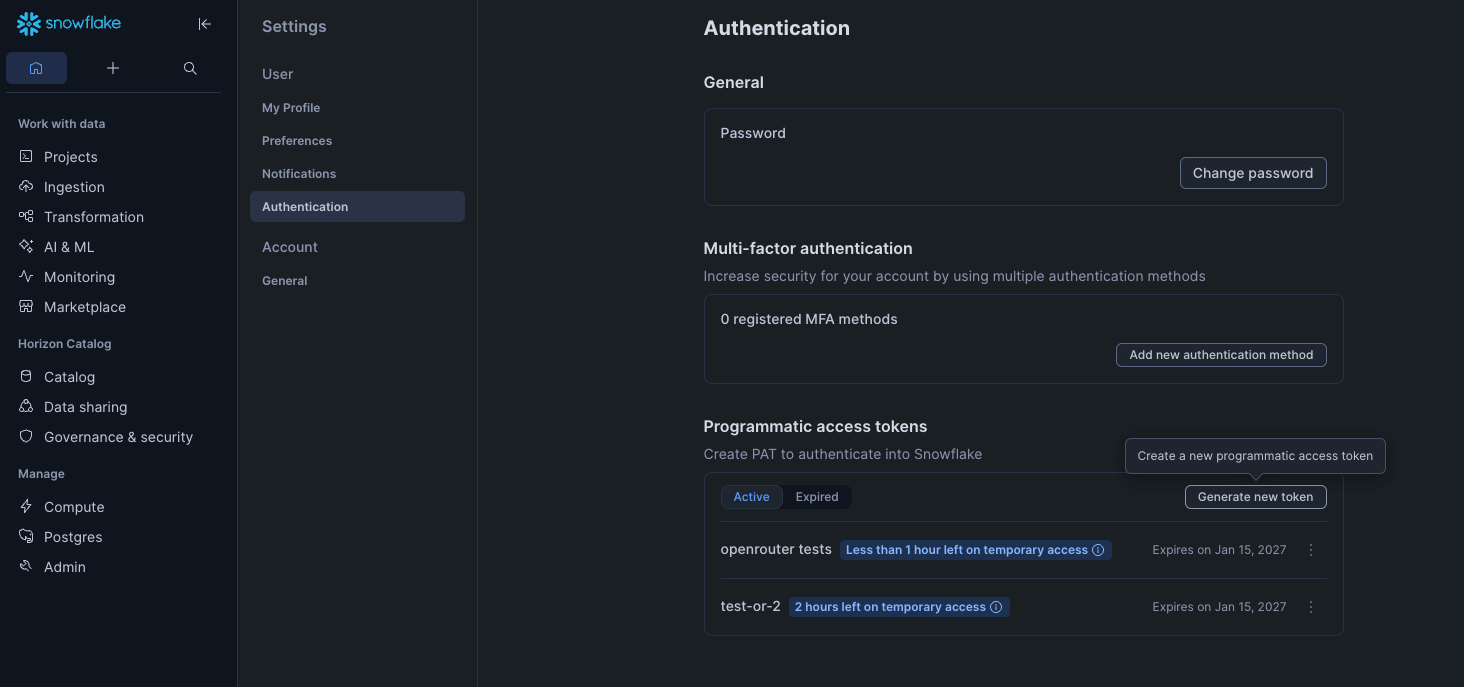
Token: Your Programmatic Access Token.
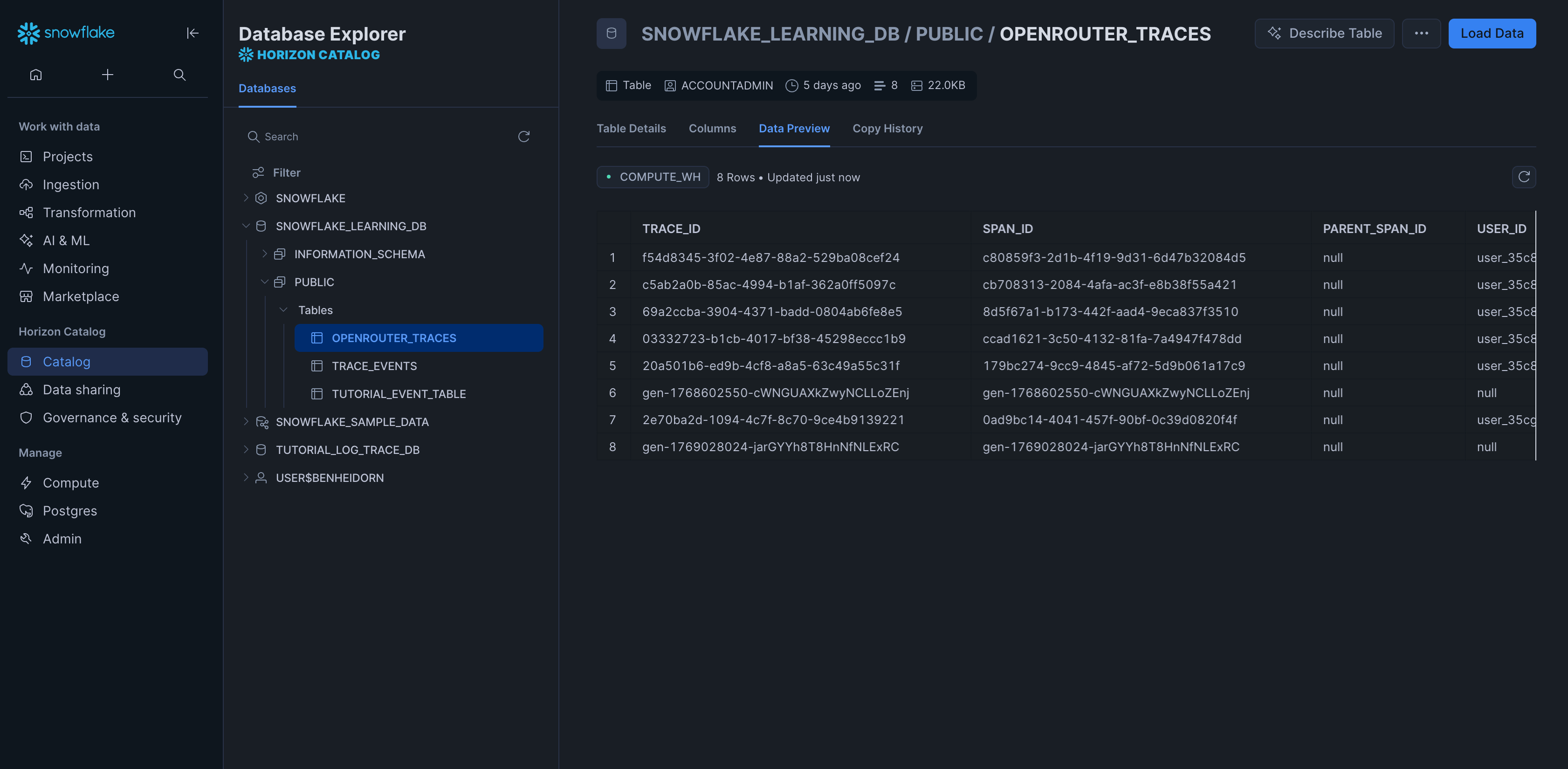
Database: Target database name (default: SNOWFLAKE_LEARNING_DB).
Schema: Target schema name (default: PUBLIC).
Table: Table name (default: OPENROUTER_TRACES).
Warehouse: Compute warehouse name (default: COMPUTE_WH).
SELECT DATE_TRUNC('day', TIMESTAMP) as day, MODEL, SUM(TOTAL_COST) as total_cost, SUM(TOTAL_TOKENS) as total_tokens, COUNT(*) as request_countFROM OPENROUTER_TRACESWHERE TIMESTAMP >= DATEADD(day, -30, CURRENT_TIMESTAMP()) AND STATUS = 'ok' AND SPAN_TYPE = 'GENERATION'GROUP BY day, MODELORDER BY day DESC, total_cost DESC;
SELECT USER_ID, COUNT(DISTINCT TRACE_ID) as trace_count, COUNT(DISTINCT SESSION_ID) as session_count, SUM(TOTAL_TOKENS) as total_tokens, SUM(TOTAL_COST) as total_cost, AVG(DURATION_MS) as avg_duration_msFROM OPENROUTER_TRACESWHERE TIMESTAMP >= DATEADD(day, -7, CURRENT_TIMESTAMP()) AND SPAN_TYPE = 'GENERATION'GROUP BY USER_IDORDER BY total_cost DESC;
SELECT PROVIDER_NAME, MODEL, AVG(DURATION_MS) as avg_duration_ms, PERCENTILE_CONT(0.5) WITHIN GROUP (ORDER BY DURATION_MS) as p50_duration_ms, PERCENTILE_CONT(0.95) WITHIN GROUP (ORDER BY DURATION_MS) as p95_duration_ms, COUNT(*) as request_countFROM OPENROUTER_TRACESWHERE TIMESTAMP >= DATEADD(day, -7, CURRENT_TIMESTAMP()) AND STATUS = 'ok' AND SPAN_TYPE = 'GENERATION'GROUP BY PROVIDER_NAME, MODELHAVING request_count >= 10ORDER BY avg_duration_ms;
SELECT API_KEY_NAME, COUNT(DISTINCT TRACE_ID) as trace_count, SUM(TOTAL_COST) as total_cost, SUM(PROMPT_TOKENS) as prompt_tokens, SUM(COMPLETION_TOKENS) as completion_tokensFROM OPENROUTER_TRACESWHERE TIMESTAMP >= DATEADD(day, -30, CURRENT_TIMESTAMP()) AND SPAN_TYPE = 'GENERATION'GROUP BY API_KEY_NAMEORDER BY total_cost DESC;
SELECT TRACE_ID, METADATA:custom_field::STRING as custom_value, ATTRIBUTES:"gen_ai.request.model"::STRING as requested_modelFROM OPENROUTER_TRACESWHERE METADATA:custom_field IS NOT NULL;
The dashboard-generated CREATE TABLE statement is the source of truth for setup. The field reference below describes the current schema without duplicating the generated SQL.
Trace identifier shared by all observations in a trace.
SPAN_ID
VARCHAR(128) NOT NULL
Unique identifier for this observation.
PARENT_SPAN_ID
VARCHAR(128)
Parent observation identifier, or NULL for an unparented observation.
USER_ID
VARCHAR(256)
End-user identifier from the request.
SESSION_ID
VARCHAR(256)
Session identifier used to group related requests.
ORGANIZATION_ID
VARCHAR(256)
Organization that owns the trace.
ENTITY_ID
VARCHAR(256) NOT NULL
Entity that owns the trace.
API_KEY_NAME
VARCHAR(256)
User-defined name of the API key used for the request.
TIMESTAMP
TIMESTAMP_NTZ NOT NULL
Trace creation timestamp.
START_TIME
TIMESTAMP_NTZ NOT NULL
Observation start time.
END_TIME
TIMESTAMP_NTZ
Observation end time, or NULL when unavailable.
DURATION_MS
NUMBER(18, 3)
Observation duration in milliseconds.
MODEL
VARCHAR(256)
Model name used for the observation.
PROVIDER_NAME
VARCHAR(256)
Provider name for the observation.
PROVIDER_SLUG
VARCHAR(256)
Provider slug identifier.
STATUS
VARCHAR(256) NOT NULL
ok or error; error is emitted only when LEVEL is ERROR.
LEVEL
VARCHAR(64) NOT NULL
Observation level: DEBUG, INFO, DEFAULT, WARNING, or ERROR.
FINISH_REASON
VARCHAR(256)
Completion finish reason, such as stop or length; not an enum.
PROMPT_TOKENS
NUMBER(18, 0) NOT NULL
Input/prompt token count.
COMPLETION_TOKENS
NUMBER(18, 0) NOT NULL
Output/completion token count.
TOTAL_TOKENS
NUMBER(18, 0) NOT NULL
Total token count.
CACHED_TOKENS
NUMBER(18, 0) NOT NULL
Cached prompt token count.
CACHE_WRITE_TOKENS
NUMBER(18, 0)
Prompt tokens written to the provider prompt cache. Added in schema version 2; tables created from version 1 don’t have this column. NULL when the provider did not report them, or when the destination’s Include cache_write_tokens setting is off. The setting is off by default; turn it on after the table has this column.
REASONING_TOKENS
NUMBER(18, 0) NOT NULL
Reasoning/thinking token count.
INPUT_COST
NUMBER(18, 8) NOT NULL
Input cost in USD.
OUTPUT_COST
NUMBER(18, 8) NOT NULL
Output cost in USD.
TOTAL_COST
NUMBER(18, 8) NOT NULL
Total cost in USD.
INPUT_UNIT_PRICE
NUMBER(18, 10)
Price per input token in USD.
OUTPUT_UNIT_PRICE
NUMBER(18, 10)
Price per output token in USD.
SPAN_TYPE
VARCHAR(64) NOT NULL
Observation type: GENERATION, SPAN, or EVENT.
SPAN_KIND
VARCHAR(64) NOT NULL
Derived from SPAN_TYPE: GENERATION → llm, EVENT → tool, and SPAN → workflow.
OPERATION_NAME
VARCHAR(256) NOT NULL
Operation type derived from the API surface, such as chat, embeddings, or image_generation.
ATTRIBUTES
VARIANT
OpenTelemetry-style attributes for compatibility.
INPUT
VARIANT
Input data, such as request messages.
OUTPUT
VARIANT
Output data, such as response messages.
METADATA
VARIANT
Combined custom, request, guardrail, and provider-attempt metadata.
TAGS
VARIANT
Trace tags array.
MODEL_PARAMETERS
VARIANT
Model parameters, such as temperature.
RESOURCE_ATTRIBUTES
VARIANT
Resource attributes, including service.name and the Broadcast source.
SCHEMA_VERSION
NUMBER(5, 0) NOT NULL
Broadcast schema version; currently defaults to 2.
OpenRouter populates all columns except for the following caller-controlled values:
TRACE_ID can be set with trace.trace_id. If supplied, the same trace ID can span multiple API requests.
PARENT_SPAN_ID can be set with trace.parent_span_id.
USER_ID comes from the request user field.
SESSION_ID comes from the request session_id field.
Custom values are stored in the METADATAVARIANT column.
Additional keys in trace are merged into METADATA using their original keys. Top-level request metadata.<k> values are also placed in METADATA, under the key metadata_<k>. There is no separate database column for each custom key. trace_name and generation_name affect internal trace and observation names but have no dedicated table columns. trace.span_name is accepted as a reserved request field but is currently ignored.
Broadcast writes one row per observation, not one row per API request. A typical request produces:
One root GENERATION row with SPAN_ID equal to the generation ID. Its PARENT_SPAN_ID is NULL unless the request set trace.parent_span_id, so identify it by SPAN_TYPE = 'GENERATION', not by a null parent.
An optional <generation_id>:moderationSPAN row.
One <generation_id>:attempt-<i>SPAN row for each provider attempt.
An optional <generation_id>:generationSPAN row.
All rows share TRACE_ID. Child rows use the generation ID as PARENT_SPAN_ID.
Only the root GENERATION row carries the request’s tokens and cost; the other rows report zero. Filter SPAN_TYPE = 'GENERATION' for per-request counts, averages, and error rates: a failed provider attempt has STATUS = 'error' even when a fallback then served the request.
Delivery is at least once and Snowflake’s primary key is informational, so deduplicate on (TRACE_ID, SPAN_ID) for idempotent ingestion.
The field reference above identifies commonly queried identifiers, timestamps, model information, token metrics, and cost metrics as typed columns for efficient filtering and aggregation.
Less commonly accessed and variable-structure data is stored in the VARIANT columns identified in the field reference above. This design balances query performance with schema flexibility and storage efficiency.
Use Snowflake’s VARIANT column syntax to query your custom metadata:
SELECT TRACE_ID, METADATA:department::STRING as department, METADATA:quarter::STRING as quarter, METADATA:model_version::STRING as model_version, TOTAL_COST, TOTAL_TOKENSFROM OPENROUTER_TRACESWHERE METADATA:department IS NOT NULL AND SPAN_TYPE = 'GENERATION'ORDER BY TIMESTAMP DESC;
When Privacy Mode is enabled for this destination, prompt and completion content and provider error text are excluded from traces. All other trace data — token usage, costs, timing, model information, and custom metadata — is still sent normally. See Privacy Mode for details.
Was this page helpful?
{"docsConfig":{"theme":"mint","$schema":"https://mintlify.com/docs.json","name":"OpenRouter | Documentation","colors":{"primary":"#7624F4","light":"#7624F4","dark":"#C8FF00"},"logo":{"light":"https://mintcdn.com/openrouter-d02e98a0/ksNSeB_K7gD-BUDh/assets/logo-v2-light.svg?fit=max\u0026auto=format\u0026n=ksNSeB_K7gD-BUDh\u0026q=85\u0026s=690e45873843519efe02bcbe45795dac","dark":"https://mintcdn.com/openrouter-d02e98a0/ksNSeB_K7gD-BUDh/assets/logo-v2-dark.svg?fit=max\u0026auto=format\u0026n=ksNSeB_K7gD-BUDh\u0026q=85\u0026s=8ba2f49b11cd9839c37dd03c62537ebd","href":"https://openrouter.ai"},"favicon":"https://mintcdn.com/openrouter-d02e98a0/n3IgkjAMQY8SgOLX/assets/favicon-v2.svg?fit=max\u0026auto=format\u0026n=n3IgkjAMQY8SgOLX\u0026q=85\u0026s=f49800815fcadee8a07dcc093051c2de","appearance":{"default":"dark"},"background":{"color":{"light":"#FCFCFE","dark":"#03080A"}},"navbar":{"links":[{"href":"https://openrouter.ai/models","label":"Models"},{"href":"https://openrouter.ai/benchmarks","label":"Benchmarks"},{"href":"https://openrouter.ai/chat","label":"Chat"},{"href":"https://openrouter.ai/rankings","label":"Rankings"},{"href":"https://openrouter.ai/apps","label":"Apps"},{"href":"https://openrouter.ai/ori","label":"Ori"},{"href":"https://openrouter.ai/pricing","label":"Pricing"}],"primary":{"type":"button","label":"Sign In","href":"https://openrouter.ai/sign-in"}},"seo":{"metatags":{"canonical":"https://openrouter.ai/docs"}},"fonts":{"family":"Plus Jakarta Sans","weight":400},"integrations":{"ga4":{"measurementId":"G-R8YZRJS2XN"},"posthog":{"apiKey":"phc_7ToS2jDeWBlMu4n2JoNzoA1FnArdKwFMFoHVnAqQ6O1","apiHost":"https://us.i.posthog.com"}},"contextual":{"options":["copy","view","chatgpt","claude","perplexity"],"display":"header"},"styling":{"latex":true},"navigation":{"pages":[]}},"deployment":{"deploymentMetadataValue":{"subdomain":"openrouter-d02e98a0","hasAudioNarration":false,"actualSubdomain":"openrouter-d02e98a0","customDomains":["openrouter.ai"],"gitSource":{"_id":"6ad7fa92692c7c940ff17a31","type":"github","owner":"openrouterteam","repo":"docs","deployBranch":"main","contentDirectory":"","isPrivate":false,"mountPath":"","label":""},"feedback":{"contextualFeedback":{"allowEmail":true},"agentFeedback":true,"issues":false,"thumbs":true},"entitlements":{"AI_CHAT":{"status":"ENABLED"},"REMOVE_BRANDING":{"status":"ENABLED"},"CONTEXTUAL_FEEDBACK":{"status":"ENABLED"},"CODE_SNIPPET_FEEDBACK":{"status":"ENABLED"},"WEB_MCP":{"status":"ENABLED"},"NARRATION":{"status":"ENABLED"}},"buildId":"6af62d7e2675a63a67e94115","clientVersion":"0.0.4117","searchFilterCounts":[{"language":"default","tag":"API Reference","count":353},{"language":"default","tag":"Client SDKs","count":248},{"language":"default","tag":"Docs","count":158},{"language":"default","tag":"Cookbook","count":64},{"language":"default","tag":"Agent SDK","count":42},{"language":"default","tag":"TypeScript SDK","count":41},{"language":"default","tag":"Python SDK","count":40},{"language":"default","tag":"Go SDK","count":39},{"language":"default","tag":"Observability","count":30},{"language":"default","tag":"Features","count":24}]},"assistantConfig":{"enableAskAiButton":false,"enableStarterQuestions":true,"enableContextualStarterQuestions":true,"enableAskAiSearchBar":true},"basePath":"/docs","hasChatPermissions":true,"hasWebMcpPermissions":true,"toggles":[{"name":"kill-isr","enabled":true,"variant":{"name":"disabled","enabled":false,"feature_enabled":true},"impressionData":false},{"name":"custom-rbac-roles","enabled":true,"variant":{"name":"disabled","enabled":false,"feature_enabled":true},"impressionData":false},{"name":"agent-mintlify-slack","enabled":true,"variant":{"name":"disabled","enabled":false,"feature_enabled":true},"impressionData":false},{"name":"agent-integrations-settings","enabled":true,"variant":{"name":"disabled","enabled":false,"feature_enabled":true},"impressionData":false},{"name":"rbac-expansion","enabled":true,"variant":{"name":"disabled","enabled":false,"feature_enabled":true},"impressionData":false},{"name":"automations-pr-grouping","enabled":true,"variant":{"name":"disabled","enabled":false,"feature_enabled":true},"impressionData":false},{"name":"custom-prefix","enabled":true,"variant":{"name":"disabled","enabled":false,"feature_enabled":true},"impressionData":false},{"name":"analytics-v7","enabled":true,"variant":{"name":"disabled","enabled":false,"feature_enabled":true},"impressionData":false},{"name":"user-flows-analytics","enabled":true,"variant":{"name":"disabled","enabled":false,"feature_enabled":true},"impressionData":false},{"name":"no-publish-flow","enabled":true,"variant":{"name":"disabled","enabled":false,"feature_enabled":true},"impressionData":false},{"name":"workos-onboarding","enabled":true,"variant":{"name":"disabled","enabled":false,"feature_enabled":true},"impressionData":false},{"name":"snapshot-serving-live","enabled":true,"variant":{"name":"disabled","enabled":false,"feature_enabled":true},"impressionData":false},{"name":"stripTemperatureMiddleware","enabled":true,"variant":{"name":"disabled","enabled":false,"feature_enabled":true},"impressionData":false},{"name":"support-platform-pylon-zendesk","enabled":true,"variant":{"name":"disabled","enabled":false,"feature_enabled":true},"impressionData":false},{"name":"snapshot-serving","enabled":true,"variant":{"name":"disabled","enabled":false,"feature_enabled":true},"impressionData":false},{"name":"instant-rollback","enabled":true,"variant":{"name":"disabled","enabled":false,"feature_enabled":true},"impressionData":false},{"name":"granular-notifications-server","enabled":true,"variant":{"name":"disabled","enabled":false,"feature_enabled":true},"impressionData":false},{"name":"granular-notifications","enabled":true,"variant":{"name":"disabled","enabled":false,"feature_enabled":true},"impressionData":false},{"name":"automations-fable","enabled":true,"variant":{"name":"disabled","enabled":false,"feature_enabled":true},"impressionData":false},{"name":"fixed-ai-action-pricing","enabled":true,"variant":{"name":"disabled","enabled":false,"feature_enabled":true},"impressionData":false},{"name":"automation-resolve-merge-conflict","enabled":true,"variant":{"name":"disabled","enabled":false,"feature_enabled":true},"impressionData":false},{"name":"scoped-publishing","enabled":true,"variant":{"name":"disabled","enabled":false,"feature_enabled":true},"impressionData":false},{"name":"mintql","enabled":true,"variant":{"name":"disabled","enabled":false,"feature_enabled":true},"impressionData":false},{"name":"page-level-analytics","enabled":true,"variant":{"name":"disabled","enabled":false,"feature_enabled":true},"impressionData":false},{"name":"editor-version-history-v2","enabled":true,"variant":{"name":"disabled","enabled":false,"feature_enabled":true},"impressionData":false},{"name":"billing-page-v2","enabled":true,"variant":{"name":"disabled","enabled":false,"feature_enabled":true},"impressionData":false},{"name":"full-page-search","enabled":true,"variant":{"name":"disabled","enabled":false,"feature_enabled":true},"impressionData":false},{"name":"workspace-projects","enabled":true,"variant":{"name":"disabled","enabled":false,"feature_enabled":true},"impressionData":false},{"name":"assistant-v5","enabled":true,"variant":{"name":"disabled","enabled":false,"feature_enabled":true},"impressionData":false},{"name":"fork-pr-previews","enabled":true,"variant":{"name":"disabled","enabled":false,"feature_enabled":true},"impressionData":false},{"name":"revalidation-jwt","enabled":true,"variant":{"name":"disabled","enabled":false,"feature_enabled":true},"impressionData":false},{"name":"workos-sso-scim","enabled":true,"variant":{"name":"disabled","enabled":false,"feature_enabled":true},"impressionData":false},{"name":"hobby-abuse-scan","enabled":true,"variant":{"name":"disabled","enabled":false,"feature_enabled":true},"impressionData":false},{"name":"dashboard-inbox","enabled":true,"variant":{"name":"disabled","enabled":false,"feature_enabled":true},"impressionData":false},{"name":"workos-signup","enabled":true,"variant":{"name":"disabled","enabled":false,"feature_enabled":true},"impressionData":false},{"name":"turbopuffer-dual-write","enabled":true,"variant":{"name":"disabled","enabled":false,"feature_enabled":true},"impressionData":false},{"name":"workos-enabled","enabled":true,"variant":{"name":"disabled","enabled":false,"feature_enabled":true},"impressionData":false},{"name":"approve-review-flow","enabled":true,"variant":{"name":"disabled","enabled":false,"feature_enabled":true},"impressionData":false},{"name":"editor-metadata","enabled":true,"variant":{"name":"disabled","enabled":false,"feature_enabled":true},"impressionData":false},{"name":"sso-setup-deadline-banner","enabled":true,"variant":{"name":"disabled","enabled":false,"feature_enabled":true},"impressionData":false},{"name":"turbopuffer-serve","enabled":true,"variant":{"name":"disabled","enabled":false,"feature_enabled":true},"impressionData":false},{"name":"live-agents","enabled":true,"variant":{"name":"disabled","enabled":false,"feature_enabled":true},"impressionData":false},{"name":"llms-txt-v2","enabled":true,"variant":{"name":"disabled","enabled":false,"feature_enabled":true},"impressionData":false}],"starterQuestions":[{"_id":"6af272c0af52927e0c2cd6a8","deploymentId":"6a349898c5627d470e2c2ff7","questionText":"How do I use the best free models in OpenRouter?","status":"active","generatedBy":"manual","createdAt":"2026-11-10T01:26:24.136Z","updatedAt":"2026-11-10T01:26:24.136Z","__v":0},{"_id":"6ad8ee98f69c2f90c2a8cc12","deploymentId":"6a349898c5627d470e2c2ff7","questionText":"How do I get started using decision models like Jev?","status":"active","generatedBy":"manual","createdAt":"2026-10-21T16:55:52.120Z","updatedAt":"2026-10-21T16:55:52.120Z","__v":0}],"googleFontsInlined":true},"customCss":[{"filePath":"style.css","content":"/* cyrillic-ext */\n@font-face {\n font-family: 'Geist Mono';\n font-style: normal;\n font-weight: 400;\n font-display: swap;\n src: url(/docs/_mintlify/assets/fonts/google/s/geistmono/v6/or3nQ6H-1_WfwkMZI_qYFrodmgPn.woff2) format('woff2');\n unicode-range: U+0460-052F, U+1C80-1C8A, U+20B4, U+2DE0-2DFF, U+A640-A69F, U+FE2E-FE2F;\n}\n/* cyrillic */\n@font-face {\n font-family: 'Geist Mono';\n font-style: normal;\n font-weight: 400;\n font-display: swap;\n src: url(/docs/_mintlify/assets/fonts/google/s/geistmono/v6/or3nQ6H-1_WfwkMZI_qYFrMdmgPn.woff2) format('woff2');\n unicode-range: U+0301, U+0400-045F, U+0490-0491, U+04B0-04B1, U+2116;\n}\n/* symbols2 */\n@font-face {\n font-family: 'Geist Mono';\n font-style: normal;\n font-weight: 400;\n font-display: swap;\n src: url(/docs/_mintlify/assets/fonts/google/s/geistmono/v6/or3nQ6H-1_WfwkMZI_qYFg08vz7ehw.woff2) format('woff2');\n unicode-range: U+2000-2001, U+2004-2008, U+200A, U+23B8-23BD, U+2500-259F;\n}\n/* vietnamese */\n@font-face {\n font-family: 'Geist Mono';\n font-style: normal;\n font-weight: 400;\n font-display: swap;\n src: url(/docs/_mintlify/assets/fonts/google/s/geistmono/v6/or3nQ6H-1_WfwkMZI_qYFrgdmgPn.woff2) format('woff2');\n unicode-range: U+0102-0103, U+0110-0111, U+0128-0129, U+0168-0169, U+01A0-01A1, U+01AF-01B0, U+0300-0301, U+0303-0304, U+0308-0309, U+0323, U+0329, U+1EA0-1EF9, U+20AB;\n}\n/* latin-ext */\n@font-face {\n font-family: 'Geist Mono';\n font-style: normal;\n font-weight: 400;\n font-display: swap;\n src: url(/docs/_mintlify/assets/fonts/google/s/geistmono/v6/or3nQ6H-1_WfwkMZI_qYFrkdmgPn.woff2) format('woff2');\n unicode-range: U+0100-02BA, U+02BD-02C5, U+02C7-02CC, U+02CE-02D7, U+02DD-02FF, U+0304, U+0308, U+0329, U+1D00-1DBF, U+1E00-1E9F, U+1EF2-1EFF, U+2020, U+20A0-20AB, U+20AD-20C4, U+2113, U+2C60-2C7F, U+A720-A7FF;\n}\n/* latin */\n@font-face {\n font-family: 'Geist Mono';\n font-style: normal;\n font-weight: 400;\n font-display: swap;\n src: url(/docs/_mintlify/assets/fonts/google/s/geistmono/v6/or3nQ6H-1_WfwkMZI_qYFrcdmg.woff2) format('woff2');\n unicode-range: U+0000-00FF, U+0131, U+0152-0153, U+02BB-02BC, U+02C6, U+02DA, U+02DC, U+0304, U+0308, U+0329, U+2000-206F, U+20AC, U+2122, U+2191, U+2193, U+2212, U+2215, U+FEFF, U+FFFD;\n}\n/* cyrillic-ext */\n@font-face {\n font-family: 'Geist Mono';\n font-style: normal;\n font-weight: 500;\n font-display: swap;\n src: url(/docs/_mintlify/assets/fonts/google/s/geistmono/v6/or3nQ6H-1_WfwkMZI_qYFrodmgPn.woff2) format('woff2');\n unicode-range: U+0460-052F, U+1C80-1C8A, U+20B4, U+2DE0-2DFF, U+A640-A69F, U+FE2E-FE2F;\n}\n/* cyrillic */\n@font-face {\n font-family: 'Geist Mono';\n font-style: normal;\n font-weight: 500;\n font-display: swap;\n src: url(/docs/_mintlify/assets/fonts/google/s/geistmono/v6/or3nQ6H-1_WfwkMZI_qYFrMdmgPn.woff2) format('woff2');\n unicode-range: U+0301, U+0400-045F, U+0490-0491, U+04B0-04B1, U+2116;\n}\n/* symbols2 */\n@font-face {\n font-family: 'Geist Mono';\n font-style: normal;\n font-weight: 500;\n font-display: swap;\n src: url(/docs/_mintlify/assets/fonts/google/s/geistmono/v6/or3nQ6H-1_WfwkMZI_qYFg08vz7ehw.woff2) format('woff2');\n unicode-range: U+2000-2001, U+2004-2008, U+200A, U+23B8-23BD, U+2500-259F;\n}\n/* vietnamese */\n@font-face {\n font-family: 'Geist Mono';\n font-style: normal;\n font-weight: 500;\n font-display: swap;\n src: url(/docs/_mintlify/assets/fonts/google/s/geistmono/v6/or3nQ6H-1_WfwkMZI_qYFrgdmgPn.woff2) format('woff2');\n unicode-range: U+0102-0103, U+0110-0111, U+0128-0129, U+0168-0169, U+01A0-01A1, U+01AF-01B0, U+0300-0301, U+0303-0304, U+0308-0309, U+0323, U+0329, U+1EA0-1EF9, U+20AB;\n}\n/* latin-ext */\n@font-face {\n font-family: 'Geist Mono';\n font-style: normal;\n font-weight: 500;\n font-display: swap;\n src: url(/docs/_mintlify/assets/fonts/google/s/geistmono/v6/or3nQ6H-1_WfwkMZI_qYFrkdmgPn.woff2) format('woff2');\n unicode-range: U+0100-02BA, U+02BD-02C5, U+02C7-02CC, U+02CE-02D7, U+02DD-02FF, U+0304, U+0308, U+0329, U+1D00-1DBF, U+1E00-1E9F, U+1EF2-1EFF, U+2020, U+20A0-20AB, U+20AD-20C4, U+2113, U+2C60-2C7F, U+A720-A7FF;\n}\n/* latin */\n@font-face {\n font-family: 'Geist Mono';\n font-style: normal;\n font-weight: 500;\n font-display: swap;\n src: url(/docs/_mintlify/assets/fonts/google/s/geistmono/v6/or3nQ6H-1_WfwkMZI_qYFrcdmg.woff2) format('woff2');\n unicode-range: U+0000-00FF, U+0131, U+0152-0153, U+02BB-02BC, U+02C6, U+02DA, U+02DC, U+0304, U+0308, U+0329, U+2000-206F, U+20AC, U+2122, U+2191, U+2193, U+2212, U+2215, U+FEFF, U+FFFD;\n}\n/* cyrillic-ext */\n@font-face {\n font-family: 'Geist Mono';\n font-style: normal;\n font-weight: 600;\n font-display: swap;\n src: url(/docs/_mintlify/assets/fonts/google/s/geistmono/v6/or3nQ6H-1_WfwkMZI_qYFrodmgPn.woff2) format('woff2');\n unicode-range: U+0460-052F, U+1C80-1C8A, U+20B4, U+2DE0-2DFF, U+A640-A69F, U+FE2E-FE2F;\n}\n/* cyrillic */\n@font-face {\n font-family: 'Geist Mono';\n font-style: normal;\n font-weight: 600;\n font-display: swap;\n src: url(/docs/_mintlify/assets/fonts/google/s/geistmono/v6/or3nQ6H-1_WfwkMZI_qYFrMdmgPn.woff2) format('woff2');\n unicode-range: U+0301, U+0400-045F, U+0490-0491, U+04B0-04B1, U+2116;\n}\n/* symbols2 */\n@font-face {\n font-family: 'Geist Mono';\n font-style: normal;\n font-weight: 600;\n font-display: swap;\n src: url(/docs/_mintlify/assets/fonts/google/s/geistmono/v6/or3nQ6H-1_WfwkMZI_qYFg08vz7ehw.woff2) format('woff2');\n unicode-range: U+2000-2001, U+2004-2008, U+200A, U+23B8-23BD, U+2500-259F;\n}\n/* vietnamese */\n@font-face {\n font-family: 'Geist Mono';\n font-style: normal;\n font-weight: 600;\n font-display: swap;\n src: url(/docs/_mintlify/assets/fonts/google/s/geistmono/v6/or3nQ6H-1_WfwkMZI_qYFrgdmgPn.woff2) format('woff2');\n unicode-range: U+0102-0103, U+0110-0111, U+0128-0129, U+0168-0169, U+01A0-01A1, U+01AF-01B0, U+0300-0301, U+0303-0304, U+0308-0309, U+0323, U+0329, U+1EA0-1EF9, U+20AB;\n}\n/* latin-ext */\n@font-face {\n font-family: 'Geist Mono';\n font-style: normal;\n font-weight: 600;\n font-display: swap;\n src: url(/docs/_mintlify/assets/fonts/google/s/geistmono/v6/or3nQ6H-1_WfwkMZI_qYFrkdmgPn.woff2) format('woff2');\n unicode-range: U+0100-02BA, U+02BD-02C5, U+02C7-02CC, U+02CE-02D7, U+02DD-02FF, U+0304, U+0308, U+0329, U+1D00-1DBF, U+1E00-1E9F, U+1EF2-1EFF, U+2020, U+20A0-20AB, U+20AD-20C4, U+2113, U+2C60-2C7F, U+A720-A7FF;\n}\n/* latin */\n@font-face {\n font-family: 'Geist Mono';\n font-style: normal;\n font-weight: 600;\n font-display: swap;\n src: url(/docs/_mintlify/assets/fonts/google/s/geistmono/v6/or3nQ6H-1_WfwkMZI_qYFrcdmg.woff2) format('woff2');\n unicode-range: U+0000-00FF, U+0131, U+0152-0153, U+02BB-02BC, U+02C6, U+02DA, U+02DC, U+0304, U+0308, U+0329, U+2000-206F, U+20AC, U+2122, U+2191, U+2193, U+2212, U+2215, U+FEFF, U+FFFD;\n}\n:root{--inverse: 3 8 10;--inverse-foreground: 252 252 254;--tooltip-background: var(--inverse);--tooltip-foreground: var(--inverse-foreground)}code,pre,pre code,.code-block code,[class*=\"code\"] code{font-family:'Geist Mono', ui-monospace, SFMono-Regular, 'SF Mono', Menlo, Consolas, monospace}::selection{background:rgb(118 36 244 / 0.25)}.dark ::selection,html.dark ::selection{background:rgb(200 255 0 / 0.25);color:inherit}.dark,[data-theme=\"dark\"],html.dark{--primary: 200 255 0;--primary-light: 200 255 0;--primary-dark: 200 255 0;--light-primary: 200 255 0;--primary-foreground: 3 8 10;--inverse: 252 252 254;--inverse-foreground: 3 8 10;--default-border-color: rgb(252 252 254 / 0.14)}#navbar{border-radius:0}#sidebar a[aria-current=\"page\"],nav[aria-label=\"Pages\"] a[aria-current=\"page\"]{border-radius:8px}[data-component-part=\"code-block-root\"]{border-radius:8px}a:not([class]){text-decoration-thickness:1px;text-underline-offset:2px;text-decoration-color:rgb(0 0 0 / 0.4)}a:not([class]):hover{text-decoration-color:currentColor}.dark a:not([class]),html.dark a:not([class]){text-decoration-color:rgb(255 255 255 / 0.4)}.dark a:not([class]):hover,html.dark a:not([class]):hover{text-decoration-color:currentColor}.nav-tag-pill-text{background:transparent!important;color:rgb(0 0 0 / 0.5)!important;border:1px solid rgb(0 0 0 / 0.2)!important}.dark .nav-tag-pill-text,html.dark .nav-tag-pill-text{background:transparent!important;color:rgb(252 252 254 / 0.5)!important;border:1px solid rgb(252 252 254 / 0.2)!important}.nav-logo{height:1.5rem}.dark nav[aria-label=\"Pages\"] button[aria-expanded] svg.transition-transform,html.dark nav[aria-label=\"Pages\"] button[aria-expanded] svg.transition-transform{color:rgb(252 252 254 / 0.627)}.dark nav[aria-label=\"Pages\"] button[aria-expanded]:hover svg.transition-transform,html.dark nav[aria-label=\"Pages\"] button[aria-expanded]:hover svg.transition-transform{color:rgb(252 252 254)}nav[aria-label=\"Pages\"] button[aria-expanded] svg.transition-transform{width:0.625rem;height:0.625rem}[role=\"tooltip\"][data-side],[data-radix-popper-content-wrapper]>div[data-state=\"delayed-open\"],[data-radix-popper-content-wrapper]>div[data-state=\"instant-open\"]{background-color:rgb(var(--tooltip-background))!important;color:rgb(var(--tooltip-foreground))!important}.callout [data-component-part=\"callout-content\"]>.code-block:first-child{margin-top:0}.callout [data-component-part=\"callout-content\"]>.code-block:last-child{margin-bottom:0}[data-floating-buttons] button{background-color:rgb(241 239 245)}.dark [data-floating-buttons] button,html.dark [data-floating-buttons] button{background-color:rgb(40 38 44)}[data-component-part=\"update-tag\"]{border:1px solid rgb(0 0 0 / 0.2);border-radius:9999px;padding:0.125rem 0.625rem;font-size:0.75rem;line-height:1.25rem;color:rgb(0 0 0 / 0.6)}.dark [data-component-part=\"update-tag\"],html.dark [data-component-part=\"update-tag\"]{border-color:rgb(252 252 254 / 0.2);color:rgb(252 252 254 / 0.6)}#topbar-cta-button svg{display:none}#topbar-cta-button a{padding-right:0.75rem}#topbar-cta-button .bg-primary-dark{background-color:rgb(var(--primary))}.dark #topbar-cta-button .text-white,html.dark #topbar-cta-button .text-white{color:rgb(3 8 10)}.dark #changelog-filters-content button.bg-primary,html.dark #changelog-filters-content button.bg-primary{color:rgb(3 8 10 / 0.9)!important}.changelog-status-badge{margin-left:0.5rem}.changelog-status-badge[data-color=\"gray\"]{border:1px solid rgb(3 8 10 / 0.3)!important}.dark .changelog-status-badge[data-color=\"gray\"],html.dark .changelog-status-badge[data-color=\"gray\"]{border-color:rgb(252 252 254 / 0.4)!important}.mermaid>svg{margin-inline:auto}.support-matrix table{font-size:0.8125rem}.support-matrix td,.support-matrix th{min-width:0;padding-right:0.5rem;white-space:nowrap}.support-matrix th code{padding-left:0.25rem;padding-right:0.25rem;font-size:0.6875rem}.pr-fig,.pr-mini{--pr-ink: #03080a;--pr-muted: rgb(3 8 10 / 0.69);--pr-rule: rgb(3 8 10 / 0.12);--pr-surface: #ffffff;--pr-positive-text: #007544;--pr-negative-text: #bf0024}.dark .pr-fig,.dark .pr-mini{--pr-ink: #fcfcfe;--pr-muted: rgb(252 252 254 / 0.627);--pr-rule: rgb(252 252 254 / 0.14);--pr-surface: #080d0f;--pr-positive-text: #34dfaa;--pr-negative-text: #ff2d55}.pr-fig{margin:1.5rem 0;padding:1rem;overflow-x:auto;container-type:inline-size;border:1px solid var(--pr-rule);border-radius:8px;background:var(--pr-surface)}.pr-fig svg{display:block;width:100%;height:auto}.pr-mini{margin:1rem 0 1.25rem}.pr-mini svg{display:block;max-width:100%;height:auto;margin-inline:auto}.pr-fig svg text,.pr-mini svg text{font-family:inherit;font-size:12px;fill:var(--pr-muted)}.pr-sw{display:inline-block;flex:none;width:12px;height:12px;border-radius:2px}.pr-bg-price{background:#0088fe}.pr-bg-ttft{background:#ffbb28}.pr-bg-speed{background:#7b68ee}.pr-bg-rel{background:#ff2d55}.pr-bg-429{background:#ff8042}.pr-bg-received{background:var(--pr-ink)}.pr-bg-capacity{background:rgb(var(--gray-400))}.pr-fill-ttft{fill:#ffbb28}.pr-fill-speed{fill:#7b68ee}.pr-fill-rel{fill:#ff2d55}.pr-fill-429{fill:#ff8042}.pr-fig .lbl{font-size:13px;fill:var(--pr-ink)}.pr-fig .num{fill:var(--pr-muted);font-variant-numeric:tabular-nums}.pr-fig .strong{fill:var(--pr-ink);font-weight:600}.pr-fig .halo{paint-order:stroke;stroke:var(--pr-surface);stroke-width:4px;stroke-linejoin:round}.pr-fig .axis{stroke:var(--pr-rule);stroke-width:1}.pr-fig .zone{fill:rgb(0 191 111 / 0.12)}.pr-fig .zone-lbl{font-weight:600;fill:var(--pr-positive-text)}.pr-fig .zone-lbl.muted{fill:var(--pr-muted)}.pr-fig .edge{stroke:#00bf6f;stroke-width:1.5;stroke-dasharray:4 3}.pr-fig .edge-curve{fill:none;stroke:#00bf6f;stroke-width:2;stroke-dasharray:5 3}.pr-fig .curve{fill:none;stroke:var(--pr-ink);stroke-width:2.5}.pr-fig .curve-fill{fill:var(--pr-ink);opacity:0.04}.pr-fig .dot{fill:var(--pr-muted);fill-opacity:0.8;stroke:var(--pr-surface);stroke-width:1.5}.pr-fig .dot-in{fill:#00bf6f;stroke:var(--pr-surface);stroke-width:1.5}.pr-fig .got{fill:none;stroke:var(--pr-ink);stroke-width:2}.pr-fig .got-fill{fill:var(--pr-ink);opacity:0.06}.pr-fig .cap{fill:none;stroke:#da70d6;stroke-width:2.5}.pr-fig .real{fill:none;stroke:var(--pr-muted);stroke-width:1.5;stroke-dasharray:5 4}.pr-fig .rate{fill:#ff8042}.pr-legend{display:flex;flex-wrap:wrap;justify-content:center;gap:0.375rem 1rem;margin-top:0.75rem;font-size:12px;color:var(--pr-muted)}.pr-legend span{display:inline-flex;align-items:center;gap:0.375rem}.pr-ln{display:inline-block;width:18px;height:0}.pr-ln-cap{border-top:2.5px solid #da70d6}.pr-ln-real{border-top:1.5px dashed var(--pr-muted)}.pr-table{margin-top:0.875rem;border-top:1px solid var(--pr-rule);font-size:12px}.pr-row{display:grid;grid-template-columns:76px minmax(0, 1fr) 84px;gap:0.5rem;align-items:center;padding:0.375rem 0;border-bottom:1px solid var(--pr-rule)}.pr-head{color:var(--pr-muted);white-space:nowrap}.pr-sub::before{content:\", \"}.pr-name{font-weight:600;color:var(--pr-ink)}.pr-bar{display:flex;height:10px}.pr-bar i{display:block;height:100%}.pr-share{display:flex;align-items:center;gap:0.375rem}.pr-share i{display:block;height:10px;max-width:54px;border-radius:2px;background:var(--pr-muted);opacity:0.5}.pr-share b{font-weight:600;font-variant-numeric:tabular-nums;color:var(--pr-muted)}@media (max-width: 560px){.pr-row{grid-template-columns:76px minmax(0, 1fr) 32px}.pr-share i{display:none}.pr-head{white-space:normal}.pr-sub{display:block}.pr-sub::before{content:none}}@container (max-width: 480px){.pr-fig svg text{font-size:15px}.pr-fig svg .lbl{font-size:16px}}@container (max-width: 400px){.pr-fig svg text{font-size:17px}.pr-fig svg .lbl{font-size:18px}}.pr-mini-row{display:flex;justify-content:center;align-items:center;gap:0.75rem 1.5rem}.pr-mini-row svg{flex:0 1 auto;min-width:0;margin-inline:0}@media (max-width: 640px){.pr-mini-row{flex-wrap:wrap}}.pr-mini .strong-lbl{fill:var(--pr-ink);font-weight:600}.pr-mini .amt{text-anchor:end;font-variant-numeric:tabular-nums}.pr-mini .op{font-size:20px}.pr-mini .paper{fill:var(--pr-surface);stroke:var(--pr-rule);stroke-width:1}.pr-mini .usual{stroke:var(--pr-muted);stroke-width:1;stroke-dasharray:3 3}.pr-mini .sum-line{stroke:var(--pr-ink);stroke-width:1}.pr-mini .price-pill{fill:#0088fe;opacity:0.12}.pr-mini .pill-text{fill:var(--pr-ink);font-weight:600;font-variant-numeric:tabular-nums}.pr-mini .neg-pill{fill:#ff2d55;opacity:0.12}.pr-mini .neg-text{font-size:13px;fill:var(--pr-negative-text);font-weight:600;font-variant-numeric:tabular-nums}.pr-mini .span-stream{fill:var(--pr-muted);opacity:0.3}.pr-mini .span-total{fill:var(--pr-rule)}.pr-mini .extra{opacity:0.45}.pr-mini .bad{fill:none;stroke:#ff2d55;stroke-width:1.5}.pr-mini .tree{fill:none;stroke:var(--pr-muted);stroke-width:1}.pr-mini .brace{fill:none;stroke:var(--pr-muted);stroke-width:1.25}.pr-mini .big-arrow{fill:none;stroke:var(--pr-ink);stroke-width:3}.pr-mini .big-arrow-head,.pr-mini .user-dot{fill:var(--pr-ink)}.pr-factors ul{list-style:none;padding-left:0}.pr-factors li{padding-left:0!important}.pr-factors li::before{display:none}.pr-factors .pr-sw,h3 .pr-sw{margin-right:0.625rem;transform:translateY(1px)}h3 .pr-sw{width:13px;height:13px;transform:translateY(-2px)}.pr-cols{display:grid;grid-template-columns:repeat(auto-fit, minmax(240px, 1fr));gap:0 1.75rem}"}],"page":{"pagePath":"guides/features/broadcast/snowflake","slug":"/guides/features/broadcast/snowflake","pageMetadata":{"publish":true,"title":"Snowflake","description":"Send traces to Snowflake","seoTitle":"Broadcast to Snowflake | OpenRouter Observability","og:site_name":"OpenRouter Documentation","og:title":"Broadcast to Snowflake - Send Traces to Your Data Warehouse","og:description":"Connect Snowflake to automatically receive traces from your OpenRouter requests. Step-by-step setup guide for Snowflake integration.","og:image":"https://openrouter.ai/dynamic-og?title=Snowflake%20Broadcast\u0026description=Send%20traces%20to%20Snowflake","og:image:width":1200,"og:image:height":630,"twitter:card":"summary_large_image","twitter:site":"@OpenRouter","noindex":false,"nofollow":false,"icon":"puzzle-piece","href":"/guides/features/broadcast/snowflake"},"description":{"compiledSource":"\"use strict\";\nconst {jsx: _jsx} = arguments[0];\nconst {useMDXComponents: _provideComponents} = arguments[0];\nfunction _createMdxContent(props) {\n const _components = {\n p: \"p\",\n ..._provideComponents(),\n ...props.components\n };\n return _jsx(_components.p, {\n children: \"Send traces to Snowflake\"\n });\n}\nfunction MDXContent(props = {}) {\n const {wrapper: MDXLayout} = {\n ..._provideComponents(),\n ...props.components\n };\n return MDXLayout ? _jsx(MDXLayout, {\n ...props,\n children: _jsx(_createMdxContent, {\n ...props\n })\n }) : _createMdxContent(props);\n}\nreturn {\n default: MDXContent\n};\n","frontmatter":{},"scope":{}},"pageType":"default","mdx":{"mdxSource":{"compiledSource":"\"use strict\";const{Fragment:_Fragment,jsx:_jsx,jsxs:_jsxs}=arguments[0];const{useMDXComponents:_provideComponents}=arguments[0];function _createMdxContent(props){const _components={a:`a`,code:`code`,li:`li`,p:`p`,pre:`pre`,span:`span`,strong:`strong`,tbody:`tbody`,td:`td`,th:`th`,thead:`thead`,tr:`tr`,ul:`ul`,..._provideComponents(),...props.components},{CodeBlock,Frame,Heading,OptimizedImage,Table,Warning}=_components;if(!CodeBlock)_missingMdxReference(`CodeBlock`,true);if(!Frame)_missingMdxReference(`Frame`,true);if(!Heading)_missingMdxReference(`Heading`,true);if(!OptimizedImage)_missingMdxReference(`OptimizedImage`,true);if(!Table)_missingMdxReference(`Table`,true);if(!Warning)_missingMdxReference(`Warning`,true);return _jsxs(_Fragment,{children:[_jsxs(_components.p,{children:[_jsx(_components.a,{href:`https://snowflake.com`,children:`Snowflake`}),` is a cloud data warehouse platform. OpenRouter can stream traces directly to your Snowflake database for custom analytics, long-term storage, and business intelligence.`]}),`\n`,_jsx(Heading,{level:`2`,id:`step-1-create-the-traces-table`,children:`Step 1: Create the traces table`}),`\n`,_jsxs(_components.p,{children:[`Before connecting OpenRouter, create the `,_jsx(_components.code,{children:`OPENROUTER_TRACES`}),` table in your Snowflake database. You can find the exact SQL in the OpenRouter dashboard when configuring the destination:`]}),`\n`,_jsx(Frame,{children:_jsx(OptimizedImage,{src:`https://mintcdn.com/openrouter-d02e98a0/PSwwwiCqAD_BNeni/assets/guides/features/broadcast/snowflake/snowflake-table-setup.png?fit=max\u0026auto=format\u0026n=PSwwwiCqAD_BNeni\u0026q=85\u0026s=83994af0ee94bbff8486e910111bfe04`,alt:`Snowflake Table Setup`,\"data-og-width\":`1950`,width:`1950`,\"data-og-height\":`1180`,height:`1180`,\"data-path\":`assets/guides/features/broadcast/snowflake/snowflake-table-setup.png`,\"data-optimize\":`true`,\"data-opv\":`3`,srcset:`https://mintcdn.com/openrouter-d02e98a0/PSwwwiCqAD_BNeni/assets/guides/features/broadcast/snowflake/snowflake-table-setup.png?w=280\u0026fit=max\u0026auto=format\u0026n=PSwwwiCqAD_BNeni\u0026q=85\u0026s=967e1cc625a3f61552e81b0b7e011092 280w, https://mintcdn.com/openrouter-d02e98a0/PSwwwiCqAD_BNeni/assets/guides/features/broadcast/snowflake/snowflake-table-setup.png?w=560\u0026fit=max\u0026auto=format\u0026n=PSwwwiCqAD_BNeni\u0026q=85\u0026s=e58ea9c24907c6336063afbc534f257b 560w, https://mintcdn.com/openrouter-d02e98a0/PSwwwiCqAD_BNeni/assets/guides/features/broadcast/snowflake/snowflake-table-setup.png?w=840\u0026fit=max\u0026auto=format\u0026n=PSwwwiCqAD_BNeni\u0026q=85\u0026s=67e926e68102b557a06585a02306fcbf 840w, https://mintcdn.com/openrouter-d02e98a0/PSwwwiCqAD_BNeni/assets/guides/features/broadcast/snowflake/snowflake-table-setup.png?w=1100\u0026fit=max\u0026auto=format\u0026n=PSwwwiCqAD_BNeni\u0026q=85\u0026s=df1c8212f875db0b41bb7b91393cb4b6 1100w, https://mintcdn.com/openrouter-d02e98a0/PSwwwiCqAD_BNeni/assets/guides/features/broadcast/snowflake/snowflake-table-setup.png?w=1650\u0026fit=max\u0026auto=format\u0026n=PSwwwiCqAD_BNeni\u0026q=85\u0026s=b987287f2e2664d48405644aea579fd4 1650w, https://mintcdn.com/openrouter-d02e98a0/PSwwwiCqAD_BNeni/assets/guides/features/broadcast/snowflake/snowflake-table-setup.png?w=2500\u0026fit=max\u0026auto=format\u0026n=PSwwwiCqAD_BNeni\u0026q=85\u0026s=01e7a9d82063754ef178bd40753d4eb8 2500w`})}),`\n`,_jsx(Heading,{level:`2`,id:`step-2-create-access-credentials`,children:`Step 2: Create access credentials`}),`\n`,_jsxs(_components.p,{children:[`Generate a `,_jsx(_components.a,{href:`https://docs.snowflake.com/en/user-guide/programmatic-access-tokens`,children:`Programmatic Access Token`}),` with `,_jsx(_components.code,{children:`ACCOUNTADMIN`}),` permissions in the Snowflake UI under `,_jsx(_components.strong,{children:`Settings > Authentication`}),`.`]}),`\n`,_jsx(Frame,{children:_jsx(OptimizedImage,{src:`https://mintcdn.com/openrouter-d02e98a0/PSwwwiCqAD_BNeni/assets/guides/features/broadcast/snowflake/snowflake-pat.png?fit=max\u0026auto=format\u0026n=PSwwwiCqAD_BNeni\u0026q=85\u0026s=111ae5fbdde62174613ae3ce4b0abad7`,alt:`Snowflake PAT`,\"data-og-width\":`1464`,width:`1464`,\"data-og-height\":`687`,height:`687`,\"data-path\":`assets/guides/features/broadcast/snowflake/snowflake-pat.png`,\"data-optimize\":`true`,\"data-opv\":`3`,srcset:`https://mintcdn.com/openrouter-d02e98a0/PSwwwiCqAD_BNeni/assets/guides/features/broadcast/snowflake/snowflake-pat.png?w=280\u0026fit=max\u0026auto=format\u0026n=PSwwwiCqAD_BNeni\u0026q=85\u0026s=048f1f980a4ba9f702db156fbb4b6de3 280w, https://mintcdn.com/openrouter-d02e98a0/PSwwwiCqAD_BNeni/assets/guides/features/broadcast/snowflake/snowflake-pat.png?w=560\u0026fit=max\u0026auto=format\u0026n=PSwwwiCqAD_BNeni\u0026q=85\u0026s=75a70eb6869d912c69ace1684bdcaee2 560w, https://mintcdn.com/openrouter-d02e98a0/PSwwwiCqAD_BNeni/assets/guides/features/broadcast/snowflake/snowflake-pat.png?w=840\u0026fit=max\u0026auto=format\u0026n=PSwwwiCqAD_BNeni\u0026q=85\u0026s=57187b73653aa7f9f35537c981116457 840w, https://mintcdn.com/openrouter-d02e98a0/PSwwwiCqAD_BNeni/assets/guides/features/broadcast/snowflake/snowflake-pat.png?w=1100\u0026fit=max\u0026auto=format\u0026n=PSwwwiCqAD_BNeni\u0026q=85\u0026s=c03e2c6056d53a9829d91bde63180f04 1100w, https://mintcdn.com/openrouter-d02e98a0/PSwwwiCqAD_BNeni/assets/guides/features/broadcast/snowflake/snowflake-pat.png?w=1650\u0026fit=max\u0026auto=format\u0026n=PSwwwiCqAD_BNeni\u0026q=85\u0026s=655199391ab19546236137e11e71344d 1650w, https://mintcdn.com/openrouter-d02e98a0/PSwwwiCqAD_BNeni/assets/guides/features/broadcast/snowflake/snowflake-pat.png?w=2500\u0026fit=max\u0026auto=format\u0026n=PSwwwiCqAD_BNeni\u0026q=85\u0026s=5e0486dd5086167d313004e0b787a826 2500w`})}),`\n`,_jsx(Heading,{level:`2`,id:`step-3-enable-broadcast-in-openrouter`,children:`Step 3: Enable Broadcast in OpenRouter`}),`\n`,_jsxs(_components.p,{children:[`Go to `,_jsx(_components.a,{href:`https://openrouter.ai/settings/observability`,children:`Settings > Observability`}),` and toggle `,_jsx(_components.strong,{children:`Enable Broadcast`}),`.`]}),`\n`,_jsx(Frame,{children:_jsx(OptimizedImage,{src:`https://mintcdn.com/openrouter-d02e98a0/PSwwwiCqAD_BNeni/assets/guides/features/broadcast/arize/broadcast-enable.png?fit=max\u0026auto=format\u0026n=PSwwwiCqAD_BNeni\u0026q=85\u0026s=a48ecd5df85b4e6f3982c8402671f631`,alt:`Enable Broadcast`,\"data-og-width\":`2692`,width:`2692`,\"data-og-height\":`1296`,height:`1296`,\"data-path\":`assets/guides/features/broadcast/arize/broadcast-enable.png`,\"data-optimize\":`true`,\"data-opv\":`3`,srcset:`https://mintcdn.com/openrouter-d02e98a0/PSwwwiCqAD_BNeni/assets/guides/features/broadcast/arize/broadcast-enable.png?w=280\u0026fit=max\u0026auto=format\u0026n=PSwwwiCqAD_BNeni\u0026q=85\u0026s=7efe86077718b23548daa1952206a30d 280w, https://mintcdn.com/openrouter-d02e98a0/PSwwwiCqAD_BNeni/assets/guides/features/broadcast/arize/broadcast-enable.png?w=560\u0026fit=max\u0026auto=format\u0026n=PSwwwiCqAD_BNeni\u0026q=85\u0026s=60ea4966ad97d858304fde7f0c843018 560w, https://mintcdn.com/openrouter-d02e98a0/PSwwwiCqAD_BNeni/assets/guides/features/broadcast/arize/broadcast-enable.png?w=840\u0026fit=max\u0026auto=format\u0026n=PSwwwiCqAD_BNeni\u0026q=85\u0026s=a802e2b7da4a5f47539dfacd6d20b057 840w, https://mintcdn.com/openrouter-d02e98a0/PSwwwiCqAD_BNeni/assets/guides/features/broadcast/arize/broadcast-enable.png?w=1100\u0026fit=max\u0026auto=format\u0026n=PSwwwiCqAD_BNeni\u0026q=85\u0026s=bd500570ddc62cba3b9f07984149f165 1100w, https://mintcdn.com/openrouter-d02e98a0/PSwwwiCqAD_BNeni/assets/guides/features/broadcast/arize/broadcast-enable.png?w=1650\u0026fit=max\u0026auto=format\u0026n=PSwwwiCqAD_BNeni\u0026q=85\u0026s=07809f6831bd7b1dbe024b330b447da1 1650w, https://mintcdn.com/openrouter-d02e98a0/PSwwwiCqAD_BNeni/assets/guides/features/broadcast/arize/broadcast-enable.png?w=2500\u0026fit=max\u0026auto=format\u0026n=PSwwwiCqAD_BNeni\u0026q=85\u0026s=cb6703f79619ec7323ef7beff912be05 2500w`})}),`\n`,_jsx(Heading,{level:`2`,id:`step-4-configure-snowflake`,children:`Step 4: Configure Snowflake`}),`\n`,_jsxs(_components.p,{children:[`Click the edit icon next to `,_jsx(_components.strong,{children:`Snowflake`}),` and enter:`]}),`\n`,_jsxs(_components.ul,{children:[`\n`,_jsxs(_components.li,{children:[_jsx(_components.strong,{children:`Account`}),`: Your Snowflake account identifier (e.g., `,_jsx(_components.code,{children:`eac52885.us-east-1`}),`). You can find your account region and your account number at the end of your Snowflake instance’s URL: `,_jsx(_components.a,{href:`https://app.snowflake.com/us-east-1/eac52885`,children:`https://app.snowflake.com/us-east-1/eac52885`}),`; together these make your account identifier.`]}),`\n`,_jsxs(_components.li,{children:[_jsx(_components.strong,{children:`Token`}),`: Your Programmatic Access Token.`]}),`\n`,_jsxs(_components.li,{children:[_jsx(_components.strong,{children:`Database`}),`: Target database name (default: `,_jsx(_components.code,{children:`SNOWFLAKE_LEARNING_DB`}),`).`]}),`\n`,_jsxs(_components.li,{children:[_jsx(_components.strong,{children:`Schema`}),`: Target schema name (default: `,_jsx(_components.code,{children:`PUBLIC`}),`).`]}),`\n`,_jsxs(_components.li,{children:[_jsx(_components.strong,{children:`Table`}),`: Table name (default: `,_jsx(_components.code,{children:`OPENROUTER_TRACES`}),`).`]}),`\n`,_jsxs(_components.li,{children:[_jsx(_components.strong,{children:`Warehouse`}),`: Compute warehouse name (default: `,_jsx(_components.code,{children:`COMPUTE_WH`}),`).`]}),`\n`]}),`\n`,_jsx(Heading,{level:`2`,id:`step-5-test-and-save`,children:`Step 5: Test and save`}),`\n`,_jsxs(_components.p,{children:[`Click `,_jsx(_components.strong,{children:`Test Connection`}),` to verify the setup. The configuration only saves if the test passes.`]}),`\n`,_jsx(Heading,{level:`2`,id:`step-6-send-a-test-trace`,children:`Step 6: Send a test trace`}),`\n`,_jsx(_components.p,{children:`Make an API request through OpenRouter and query your Snowflake table to verify the trace was received.`}),`\n`,_jsx(Frame,{children:_jsx(OptimizedImage,{src:`https://mintcdn.com/openrouter-d02e98a0/PSwwwiCqAD_BNeni/assets/guides/features/broadcast/snowflake/snowflake-test-trace.png?fit=max\u0026auto=format\u0026n=PSwwwiCqAD_BNeni\u0026q=85\u0026s=35f3639a8aa372dd3b5635a2e9cb84dc`,alt:`Snowflake Test Trace`,\"data-og-width\":`3364`,width:`3364`,\"data-og-height\":`1650`,height:`1650`,\"data-path\":`assets/guides/features/broadcast/snowflake/snowflake-test-trace.png`,\"data-optimize\":`true`,\"data-opv\":`3`,srcset:`https://mintcdn.com/openrouter-d02e98a0/PSwwwiCqAD_BNeni/assets/guides/features/broadcast/snowflake/snowflake-test-trace.png?w=280\u0026fit=max\u0026auto=format\u0026n=PSwwwiCqAD_BNeni\u0026q=85\u0026s=e2ebfc63f5215ca2b5ba5b459258f4cc 280w, https://mintcdn.com/openrouter-d02e98a0/PSwwwiCqAD_BNeni/assets/guides/features/broadcast/snowflake/snowflake-test-trace.png?w=560\u0026fit=max\u0026auto=format\u0026n=PSwwwiCqAD_BNeni\u0026q=85\u0026s=0ba9a76bc015162b5e10b60f478c53f2 560w, https://mintcdn.com/openrouter-d02e98a0/PSwwwiCqAD_BNeni/assets/guides/features/broadcast/snowflake/snowflake-test-trace.png?w=840\u0026fit=max\u0026auto=format\u0026n=PSwwwiCqAD_BNeni\u0026q=85\u0026s=c2df09238eec70d8006f31bda0ea3ad5 840w, https://mintcdn.com/openrouter-d02e98a0/PSwwwiCqAD_BNeni/assets/guides/features/broadcast/snowflake/snowflake-test-trace.png?w=1100\u0026fit=max\u0026auto=format\u0026n=PSwwwiCqAD_BNeni\u0026q=85\u0026s=4c7bfcd04c4c638c51aa1e6c47f0543b 1100w, https://mintcdn.com/openrouter-d02e98a0/PSwwwiCqAD_BNeni/assets/guides/features/broadcast/snowflake/snowflake-test-trace.png?w=1650\u0026fit=max\u0026auto=format\u0026n=PSwwwiCqAD_BNeni\u0026q=85\u0026s=70c08724eaab97e329ca5c720e160a63 1650w, https://mintcdn.com/openrouter-d02e98a0/PSwwwiCqAD_BNeni/assets/guides/features/broadcast/snowflake/snowflake-test-trace.png?w=2500\u0026fit=max\u0026auto=format\u0026n=PSwwwiCqAD_BNeni\u0026q=85\u0026s=0f7e8aa113b261ca2296317177472376 2500w`})}),`\n`,_jsx(Heading,{level:`2`,id:`example-queries`,children:`Example queries`}),`\n`,_jsx(Heading,{level:`3`,id:`cost-analysis-by-model`,children:`Cost analysis by model`}),`\n`,_jsx(CodeBlock,{filename:``,lines:`true`,numberOfLines:`12`,language:`sql`,children:_jsx(_components.pre,{className:`shiki shiki-themes github-light-default dark-plus`,style:{backgroundColor:`#ffffff`,\"--shiki-dark-bg\":`#0B0C0E`,color:`#1f2328`,\"--shiki-dark\":`#D4D4D4`},language:`sql`,children:_jsxs(_components.code,{language:`sql`,numberOfLines:`12`,children:[_jsx(_components.span,{className:`line`,children:_jsx(_components.span,{style:{color:`#CF222E`,\"--shiki-dark\":`#569CD6`},children:`SELECT`})}),`\n`,_jsxs(_components.span,{className:`line`,children:[_jsx(_components.span,{style:{color:`#1F2328`,\"--shiki-dark\":`#D4D4D4`},children:` DATE_TRUNC(`}),_jsx(_components.span,{style:{color:`#0A3069`,\"--shiki-dark\":`#CE9178`},children:`'day'`}),_jsx(_components.span,{style:{color:`#1F2328`,\"--shiki-dark\":`#D4D4D4`},children:`, `}),_jsx(_components.span,{style:{color:`#CF222E`,\"--shiki-dark\":`#569CD6`},children:`TIMESTAMP`}),_jsx(_components.span,{style:{color:`#1F2328`,\"--shiki-dark\":`#D4D4D4`},children:`) `}),_jsx(_components.span,{style:{color:`#CF222E`,\"--shiki-dark\":`#569CD6`},children:`as`}),_jsx(_components.span,{style:{color:`#CF222E`,\"--shiki-dark\":`#569CD6`},children:` day`}),_jsx(_components.span,{style:{color:`#1F2328`,\"--shiki-dark\":`#D4D4D4`},children:`,`})]}),`\n`,_jsx(_components.span,{className:`line`,children:_jsx(_components.span,{style:{color:`#1F2328`,\"--shiki-dark\":`#D4D4D4`},children:` MODEL,`})}),`\n`,_jsxs(_components.span,{className:`line`,children:[_jsx(_components.span,{style:{color:`#0550AE`,\"--shiki-dark\":`#DCDCAA`},children:` SUM`}),_jsx(_components.span,{style:{color:`#1F2328`,\"--shiki-dark\":`#D4D4D4`},children:`(TOTAL_COST) `}),_jsx(_components.span,{style:{color:`#CF222E`,\"--shiki-dark\":`#569CD6`},children:`as`}),_jsx(_components.span,{style:{color:`#1F2328`,\"--shiki-dark\":`#D4D4D4`},children:` total_cost,`})]}),`\n`,_jsxs(_components.span,{className:`line`,children:[_jsx(_components.span,{style:{color:`#0550AE`,\"--shiki-dark\":`#DCDCAA`},children:` SUM`}),_jsx(_components.span,{style:{color:`#1F2328`,\"--shiki-dark\":`#D4D4D4`},children:`(TOTAL_TOKENS) `}),_jsx(_components.span,{style:{color:`#CF222E`,\"--shiki-dark\":`#569CD6`},children:`as`}),_jsx(_components.span,{style:{color:`#1F2328`,\"--shiki-dark\":`#D4D4D4`},children:` total_tokens,`})]}),`\n`,_jsxs(_components.span,{className:`line`,children:[_jsx(_components.span,{style:{color:`#0550AE`,\"--shiki-dark\":`#DCDCAA`},children:` COUNT`}),_jsx(_components.span,{style:{color:`#1F2328`,\"--shiki-dark\":`#D4D4D4`},children:`(`}),_jsx(_components.span,{style:{color:`#CF222E`,\"--shiki-dark\":`#D4D4D4`},children:`*`}),_jsx(_components.span,{style:{color:`#1F2328`,\"--shiki-dark\":`#D4D4D4`},children:`) `}),_jsx(_components.span,{style:{color:`#CF222E`,\"--shiki-dark\":`#569CD6`},children:`as`}),_jsx(_components.span,{style:{color:`#1F2328`,\"--shiki-dark\":`#D4D4D4`},children:` request_count`})]}),`\n`,_jsxs(_components.span,{className:`line`,children:[_jsx(_components.span,{style:{color:`#CF222E`,\"--shiki-dark\":`#569CD6`},children:`FROM`}),_jsx(_components.span,{style:{color:`#1F2328`,\"--shiki-dark\":`#D4D4D4`},children:` OPENROUTER_TRACES`})]}),`\n`,_jsxs(_components.span,{className:`line`,children:[_jsx(_components.span,{style:{color:`#CF222E`,\"--shiki-dark\":`#569CD6`},children:`WHERE`}),_jsx(_components.span,{style:{color:`#CF222E`,\"--shiki-dark\":`#569CD6`},children:` TIMESTAMP`}),_jsx(_components.span,{style:{color:`#CF222E`,\"--shiki-dark\":`#D4D4D4`},children:` >=`}),_jsx(_components.span,{style:{color:`#0550AE`,\"--shiki-dark\":`#DCDCAA`},children:` DATEADD`}),_jsx(_components.span,{style:{color:`#1F2328`,\"--shiki-dark\":`#D4D4D4`},children:`(`}),_jsx(_components.span,{style:{color:`#CF222E`,\"--shiki-dark\":`#569CD6`},children:`day`}),_jsx(_components.span,{style:{color:`#1F2328`,\"--shiki-dark\":`#D4D4D4`},children:`, `}),_jsx(_components.span,{style:{color:`#CF222E`,\"--shiki-dark\":`#D4D4D4`},children:`-`}),_jsx(_components.span,{style:{color:`#0550AE`,\"--shiki-dark\":`#B5CEA8`},children:`30`}),_jsx(_components.span,{style:{color:`#1F2328`,\"--shiki-dark\":`#D4D4D4`},children:`, `}),_jsx(_components.span,{style:{color:`#0550AE`,\"--shiki-dark\":`#DCDCAA`},children:`CURRENT_TIMESTAMP`}),_jsx(_components.span,{style:{color:`#1F2328`,\"--shiki-dark\":`#D4D4D4`},children:`())`})]}),`\n`,_jsxs(_components.span,{className:`line`,children:[_jsx(_components.span,{style:{color:`#CF222E`,\"--shiki-dark\":`#569CD6`},children:` AND`}),_jsx(_components.span,{style:{color:`#CF222E`,\"--shiki-dark\":`#569CD6`},children:` STATUS`}),_jsx(_components.span,{style:{color:`#CF222E`,\"--shiki-dark\":`#D4D4D4`},children:` =`}),_jsx(_components.span,{style:{color:`#0A3069`,\"--shiki-dark\":`#CE9178`},children:` 'ok'`})]}),`\n`,_jsxs(_components.span,{className:`line`,children:[_jsx(_components.span,{style:{color:`#CF222E`,\"--shiki-dark\":`#569CD6`},children:` AND`}),_jsx(_components.span,{style:{color:`#1F2328`,\"--shiki-dark\":`#D4D4D4`},children:` SPAN_TYPE `}),_jsx(_components.span,{style:{color:`#CF222E`,\"--shiki-dark\":`#D4D4D4`},children:`=`}),_jsx(_components.span,{style:{color:`#0A3069`,\"--shiki-dark\":`#CE9178`},children:` 'GENERATION'`})]}),`\n`,_jsxs(_components.span,{className:`line`,children:[_jsx(_components.span,{style:{color:`#CF222E`,\"--shiki-dark\":`#569CD6`},children:`GROUP BY`}),_jsx(_components.span,{style:{color:`#CF222E`,\"--shiki-dark\":`#569CD6`},children:` day`}),_jsx(_components.span,{style:{color:`#1F2328`,\"--shiki-dark\":`#D4D4D4`},children:`, MODEL`})]}),`\n`,_jsxs(_components.span,{className:`line`,children:[_jsx(_components.span,{style:{color:`#CF222E`,\"--shiki-dark\":`#569CD6`},children:`ORDER BY`}),_jsx(_components.span,{style:{color:`#CF222E`,\"--shiki-dark\":`#569CD6`},children:` day`}),_jsx(_components.span,{style:{color:`#CF222E`,\"--shiki-dark\":`#569CD6`},children:` DESC`}),_jsx(_components.span,{style:{color:`#1F2328`,\"--shiki-dark\":`#D4D4D4`},children:`, total_cost `}),_jsx(_components.span,{style:{color:`#CF222E`,\"--shiki-dark\":`#569CD6`},children:`DESC`}),_jsx(_components.span,{style:{color:`#1F2328`,\"--shiki-dark\":`#D4D4D4`},children:`;`})]}),`\n`]})})}),`\n`,_jsx(Heading,{level:`3`,id:`user-activity-analysis`,children:`User activity analysis`}),`\n`,_jsx(CodeBlock,{filename:``,lines:`true`,numberOfLines:`12`,language:`sql`,children:_jsx(_components.pre,{className:`shiki shiki-themes github-light-default dark-plus`,style:{backgroundColor:`#ffffff`,\"--shiki-dark-bg\":`#0B0C0E`,color:`#1f2328`,\"--shiki-dark\":`#D4D4D4`},language:`sql`,children:_jsxs(_components.code,{language:`sql`,numberOfLines:`12`,children:[_jsx(_components.span,{className:`line`,children:_jsx(_components.span,{style:{color:`#CF222E`,\"--shiki-dark\":`#569CD6`},children:`SELECT`})}),`\n`,_jsx(_components.span,{className:`line`,children:_jsx(_components.span,{style:{color:`#1F2328`,\"--shiki-dark\":`#D4D4D4`},children:` USER_ID,`})}),`\n`,_jsxs(_components.span,{className:`line`,children:[_jsx(_components.span,{style:{color:`#0550AE`,\"--shiki-dark\":`#DCDCAA`},children:` COUNT`}),_jsx(_components.span,{style:{color:`#1F2328`,\"--shiki-dark\":`#D4D4D4`},children:`(`}),_jsx(_components.span,{style:{color:`#CF222E`,\"--shiki-dark\":`#569CD6`},children:`DISTINCT`}),_jsx(_components.span,{style:{color:`#1F2328`,\"--shiki-dark\":`#D4D4D4`},children:` TRACE_ID) `}),_jsx(_components.span,{style:{color:`#CF222E`,\"--shiki-dark\":`#569CD6`},children:`as`}),_jsx(_components.span,{style:{color:`#1F2328`,\"--shiki-dark\":`#D4D4D4`},children:` trace_count,`})]}),`\n`,_jsxs(_components.span,{className:`line`,children:[_jsx(_components.span,{style:{color:`#0550AE`,\"--shiki-dark\":`#DCDCAA`},children:` COUNT`}),_jsx(_components.span,{style:{color:`#1F2328`,\"--shiki-dark\":`#D4D4D4`},children:`(`}),_jsx(_components.span,{style:{color:`#CF222E`,\"--shiki-dark\":`#569CD6`},children:`DISTINCT`}),_jsx(_components.span,{style:{color:`#1F2328`,\"--shiki-dark\":`#D4D4D4`},children:` SESSION_ID) `}),_jsx(_components.span,{style:{color:`#CF222E`,\"--shiki-dark\":`#569CD6`},children:`as`}),_jsx(_components.span,{style:{color:`#1F2328`,\"--shiki-dark\":`#D4D4D4`},children:` session_count,`})]}),`\n`,_jsxs(_components.span,{className:`line`,children:[_jsx(_components.span,{style:{color:`#0550AE`,\"--shiki-dark\":`#DCDCAA`},children:` SUM`}),_jsx(_components.span,{style:{color:`#1F2328`,\"--shiki-dark\":`#D4D4D4`},children:`(TOTAL_TOKENS) `}),_jsx(_components.span,{style:{color:`#CF222E`,\"--shiki-dark\":`#569CD6`},children:`as`}),_jsx(_components.span,{style:{color:`#1F2328`,\"--shiki-dark\":`#D4D4D4`},children:` total_tokens,`})]}),`\n`,_jsxs(_components.span,{className:`line`,children:[_jsx(_components.span,{style:{color:`#0550AE`,\"--shiki-dark\":`#DCDCAA`},children:` SUM`}),_jsx(_components.span,{style:{color:`#1F2328`,\"--shiki-dark\":`#D4D4D4`},children:`(TOTAL_COST) `}),_jsx(_components.span,{style:{color:`#CF222E`,\"--shiki-dark\":`#569CD6`},children:`as`}),_jsx(_components.span,{style:{color:`#1F2328`,\"--shiki-dark\":`#D4D4D4`},children:` total_cost,`})]}),`\n`,_jsxs(_components.span,{className:`line`,children:[_jsx(_components.span,{style:{color:`#0550AE`,\"--shiki-dark\":`#DCDCAA`},children:` AVG`}),_jsx(_components.span,{style:{color:`#1F2328`,\"--shiki-dark\":`#D4D4D4`},children:`(DURATION_MS) `}),_jsx(_components.span,{style:{color:`#CF222E`,\"--shiki-dark\":`#569CD6`},children:`as`}),_jsx(_components.span,{style:{color:`#1F2328`,\"--shiki-dark\":`#D4D4D4`},children:` avg_duration_ms`})]}),`\n`,_jsxs(_components.span,{className:`line`,children:[_jsx(_components.span,{style:{color:`#CF222E`,\"--shiki-dark\":`#569CD6`},children:`FROM`}),_jsx(_components.span,{style:{color:`#1F2328`,\"--shiki-dark\":`#D4D4D4`},children:` OPENROUTER_TRACES`})]}),`\n`,_jsxs(_components.span,{className:`line`,children:[_jsx(_components.span,{style:{color:`#CF222E`,\"--shiki-dark\":`#569CD6`},children:`WHERE`}),_jsx(_components.span,{style:{color:`#CF222E`,\"--shiki-dark\":`#569CD6`},children:` TIMESTAMP`}),_jsx(_components.span,{style:{color:`#CF222E`,\"--shiki-dark\":`#D4D4D4`},children:` >=`}),_jsx(_components.span,{style:{color:`#0550AE`,\"--shiki-dark\":`#DCDCAA`},children:` DATEADD`}),_jsx(_components.span,{style:{color:`#1F2328`,\"--shiki-dark\":`#D4D4D4`},children:`(`}),_jsx(_components.span,{style:{color:`#CF222E`,\"--shiki-dark\":`#569CD6`},children:`day`}),_jsx(_components.span,{style:{color:`#1F2328`,\"--shiki-dark\":`#D4D4D4`},children:`, `}),_jsx(_components.span,{style:{color:`#CF222E`,\"--shiki-dark\":`#D4D4D4`},children:`-`}),_jsx(_components.span,{style:{color:`#0550AE`,\"--shiki-dark\":`#B5CEA8`},children:`7`}),_jsx(_components.span,{style:{color:`#1F2328`,\"--shiki-dark\":`#D4D4D4`},children:`, `}),_jsx(_components.span,{style:{color:`#0550AE`,\"--shiki-dark\":`#DCDCAA`},children:`CURRENT_TIMESTAMP`}),_jsx(_components.span,{style:{color:`#1F2328`,\"--shiki-dark\":`#D4D4D4`},children:`())`})]}),`\n`,_jsxs(_components.span,{className:`line`,children:[_jsx(_components.span,{style:{color:`#CF222E`,\"--shiki-dark\":`#569CD6`},children:` AND`}),_jsx(_components.span,{style:{color:`#1F2328`,\"--shiki-dark\":`#D4D4D4`},children:` SPAN_TYPE `}),_jsx(_components.span,{style:{color:`#CF222E`,\"--shiki-dark\":`#D4D4D4`},children:`=`}),_jsx(_components.span,{style:{color:`#0A3069`,\"--shiki-dark\":`#CE9178`},children:` 'GENERATION'`})]}),`\n`,_jsxs(_components.span,{className:`line`,children:[_jsx(_components.span,{style:{color:`#CF222E`,\"--shiki-dark\":`#569CD6`},children:`GROUP BY`}),_jsx(_components.span,{style:{color:`#1F2328`,\"--shiki-dark\":`#D4D4D4`},children:` USER_ID`})]}),`\n`,_jsxs(_components.span,{className:`line`,children:[_jsx(_components.span,{style:{color:`#CF222E`,\"--shiki-dark\":`#569CD6`},children:`ORDER BY`}),_jsx(_components.span,{style:{color:`#1F2328`,\"--shiki-dark\":`#D4D4D4`},children:` total_cost `}),_jsx(_components.span,{style:{color:`#CF222E`,\"--shiki-dark\":`#569CD6`},children:`DESC`}),_jsx(_components.span,{style:{color:`#1F2328`,\"--shiki-dark\":`#D4D4D4`},children:`;`})]}),`\n`]})})}),`\n`,_jsx(Heading,{level:`3`,id:`error-analysis`,children:`Error analysis`}),`\n`,_jsx(CodeBlock,{filename:``,lines:`true`,numberOfLines:`13`,language:`sql`,children:_jsx(_components.pre,{className:`shiki shiki-themes github-light-default dark-plus`,style:{backgroundColor:`#ffffff`,\"--shiki-dark-bg\":`#0B0C0E`,color:`#1f2328`,\"--shiki-dark\":`#D4D4D4`},language:`sql`,children:_jsxs(_components.code,{language:`sql`,numberOfLines:`13`,children:[_jsx(_components.span,{className:`line`,children:_jsx(_components.span,{style:{color:`#CF222E`,\"--shiki-dark\":`#569CD6`},children:`SELECT`})}),`\n`,_jsx(_components.span,{className:`line`,children:_jsx(_components.span,{style:{color:`#1F2328`,\"--shiki-dark\":`#D4D4D4`},children:` TRACE_ID,`})}),`\n`,_jsxs(_components.span,{className:`line`,children:[_jsx(_components.span,{style:{color:`#CF222E`,\"--shiki-dark\":`#569CD6`},children:` TIMESTAMP`}),_jsx(_components.span,{style:{color:`#1F2328`,\"--shiki-dark\":`#D4D4D4`},children:`,`})]}),`\n`,_jsx(_components.span,{className:`line`,children:_jsx(_components.span,{style:{color:`#1F2328`,\"--shiki-dark\":`#D4D4D4`},children:` MODEL,`})}),`\n`,_jsxs(_components.span,{className:`line`,children:[_jsx(_components.span,{style:{color:`#CF222E`,\"--shiki-dark\":`#569CD6`},children:` LEVEL`}),_jsx(_components.span,{style:{color:`#1F2328`,\"--shiki-dark\":`#D4D4D4`},children:`,`})]}),`\n`,_jsx(_components.span,{className:`line`,children:_jsx(_components.span,{style:{color:`#1F2328`,\"--shiki-dark\":`#D4D4D4`},children:` FINISH_REASON,`})}),`\n`,_jsxs(_components.span,{className:`line`,children:[_jsx(_components.span,{style:{color:`#1F2328`,\"--shiki-dark\":`#D4D4D4`},children:` METADATA `}),_jsx(_components.span,{style:{color:`#CF222E`,\"--shiki-dark\":`#569CD6`},children:`as`}),_jsx(_components.span,{style:{color:`#1F2328`,\"--shiki-dark\":`#D4D4D4`},children:` user_metadata,`})]}),`\n`,_jsx(_components.span,{className:`line`,children:_jsx(_components.span,{style:{color:`#1F2328`,\"--shiki-dark\":`#D4D4D4`},children:` INPUT,`})}),`\n`,_jsx(_components.span,{className:`line`,children:_jsx(_components.span,{style:{color:`#CF222E`,\"--shiki-dark\":`#569CD6`},children:` OUTPUT`})}),`\n`,_jsxs(_components.span,{className:`line`,children:[_jsx(_components.span,{style:{color:`#CF222E`,\"--shiki-dark\":`#569CD6`},children:`FROM`}),_jsx(_components.span,{style:{color:`#1F2328`,\"--shiki-dark\":`#D4D4D4`},children:` OPENROUTER_TRACES`})]}),`\n`,_jsxs(_components.span,{className:`line`,children:[_jsx(_components.span,{style:{color:`#CF222E`,\"--shiki-dark\":`#569CD6`},children:`WHERE`}),_jsx(_components.span,{style:{color:`#CF222E`,\"--shiki-dark\":`#569CD6`},children:` STATUS`}),_jsx(_components.span,{style:{color:`#CF222E`,\"--shiki-dark\":`#D4D4D4`},children:` =`}),_jsx(_components.span,{style:{color:`#0A3069`,\"--shiki-dark\":`#CE9178`},children:` 'error'`})]}),`\n`,_jsxs(_components.span,{className:`line`,children:[_jsx(_components.span,{style:{color:`#CF222E`,\"--shiki-dark\":`#569CD6`},children:` AND`}),_jsx(_components.span,{style:{color:`#CF222E`,\"--shiki-dark\":`#569CD6`},children:` TIMESTAMP`}),_jsx(_components.span,{style:{color:`#CF222E`,\"--shiki-dark\":`#D4D4D4`},children:` >=`}),_jsx(_components.span,{style:{color:`#0550AE`,\"--shiki-dark\":`#DCDCAA`},children:` DATEADD`}),_jsx(_components.span,{style:{color:`#1F2328`,\"--shiki-dark\":`#D4D4D4`},children:`(`}),_jsx(_components.span,{style:{color:`#CF222E`,\"--shiki-dark\":`#569CD6`},children:`hour`}),_jsx(_components.span,{style:{color:`#1F2328`,\"--shiki-dark\":`#D4D4D4`},children:`, `}),_jsx(_components.span,{style:{color:`#CF222E`,\"--shiki-dark\":`#D4D4D4`},children:`-`}),_jsx(_components.span,{style:{color:`#0550AE`,\"--shiki-dark\":`#B5CEA8`},children:`1`}),_jsx(_components.span,{style:{color:`#1F2328`,\"--shiki-dark\":`#D4D4D4`},children:`, `}),_jsx(_components.span,{style:{color:`#0550AE`,\"--shiki-dark\":`#DCDCAA`},children:`CURRENT_TIMESTAMP`}),_jsx(_components.span,{style:{color:`#1F2328`,\"--shiki-dark\":`#D4D4D4`},children:`())`})]}),`\n`,_jsxs(_components.span,{className:`line`,children:[_jsx(_components.span,{style:{color:`#CF222E`,\"--shiki-dark\":`#569CD6`},children:`ORDER BY`}),_jsx(_components.span,{style:{color:`#CF222E`,\"--shiki-dark\":`#569CD6`},children:` TIMESTAMP`}),_jsx(_components.span,{style:{color:`#CF222E`,\"--shiki-dark\":`#569CD6`},children:` DESC`}),_jsx(_components.span,{style:{color:`#1F2328`,\"--shiki-dark\":`#D4D4D4`},children:`;`})]}),`\n`]})})}),`\n`,_jsx(Heading,{level:`3`,id:`provider-performance-comparison`,children:`Provider performance comparison`}),`\n`,_jsx(CodeBlock,{filename:``,lines:`true`,numberOfLines:`14`,language:`sql`,children:_jsx(_components.pre,{className:`shiki shiki-themes github-light-default dark-plus`,style:{backgroundColor:`#ffffff`,\"--shiki-dark-bg\":`#0B0C0E`,color:`#1f2328`,\"--shiki-dark\":`#D4D4D4`},language:`sql`,children:_jsxs(_components.code,{language:`sql`,numberOfLines:`14`,children:[_jsx(_components.span,{className:`line`,children:_jsx(_components.span,{style:{color:`#CF222E`,\"--shiki-dark\":`#569CD6`},children:`SELECT`})}),`\n`,_jsx(_components.span,{className:`line`,children:_jsx(_components.span,{style:{color:`#1F2328`,\"--shiki-dark\":`#D4D4D4`},children:` PROVIDER_NAME,`})}),`\n`,_jsx(_components.span,{className:`line`,children:_jsx(_components.span,{style:{color:`#1F2328`,\"--shiki-dark\":`#D4D4D4`},children:` MODEL,`})}),`\n`,_jsxs(_components.span,{className:`line`,children:[_jsx(_components.span,{style:{color:`#0550AE`,\"--shiki-dark\":`#DCDCAA`},children:` AVG`}),_jsx(_components.span,{style:{color:`#1F2328`,\"--shiki-dark\":`#D4D4D4`},children:`(DURATION_MS) `}),_jsx(_components.span,{style:{color:`#CF222E`,\"--shiki-dark\":`#569CD6`},children:`as`}),_jsx(_components.span,{style:{color:`#1F2328`,\"--shiki-dark\":`#D4D4D4`},children:` avg_duration_ms,`})]}),`\n`,_jsxs(_components.span,{className:`line`,children:[_jsx(_components.span,{style:{color:`#0550AE`,\"--shiki-dark\":`#DCDCAA`},children:` PERCENTILE_CONT`}),_jsx(_components.span,{style:{color:`#1F2328`,\"--shiki-dark\":`#D4D4D4`},children:`(`}),_jsx(_components.span,{style:{color:`#0550AE`,\"--shiki-dark\":`#B5CEA8`},children:`0`}),_jsx(_components.span,{style:{color:`#1F2328`,\"--shiki-dark\":`#D4D4D4`},children:`.`}),_jsx(_components.span,{style:{color:`#0550AE`,\"--shiki-dark\":`#B5CEA8`},children:`5`}),_jsx(_components.span,{style:{color:`#1F2328`,\"--shiki-dark\":`#D4D4D4`},children:`) `}),_jsx(_components.span,{style:{color:`#CF222E`,\"--shiki-dark\":`#569CD6`},children:`WITHIN`}),_jsx(_components.span,{style:{color:`#0550AE`,\"--shiki-dark\":`#DCDCAA`},children:` GROUP`}),_jsx(_components.span,{style:{color:`#1F2328`,\"--shiki-dark\":`#D4D4D4`},children:` (`}),_jsx(_components.span,{style:{color:`#CF222E`,\"--shiki-dark\":`#569CD6`},children:`ORDER BY`}),_jsx(_components.span,{style:{color:`#1F2328`,\"--shiki-dark\":`#D4D4D4`},children:` DURATION_MS) `}),_jsx(_components.span,{style:{color:`#CF222E`,\"--shiki-dark\":`#569CD6`},children:`as`}),_jsx(_components.span,{style:{color:`#1F2328`,\"--shiki-dark\":`#D4D4D4`},children:` p50_duration_ms,`})]}),`\n`,_jsxs(_components.span,{className:`line`,children:[_jsx(_components.span,{style:{color:`#0550AE`,\"--shiki-dark\":`#DCDCAA`},children:` PERCENTILE_CONT`}),_jsx(_components.span,{style:{color:`#1F2328`,\"--shiki-dark\":`#D4D4D4`},children:`(`}),_jsx(_components.span,{style:{color:`#0550AE`,\"--shiki-dark\":`#B5CEA8`},children:`0`}),_jsx(_components.span,{style:{color:`#1F2328`,\"--shiki-dark\":`#D4D4D4`},children:`.`}),_jsx(_components.span,{style:{color:`#0550AE`,\"--shiki-dark\":`#B5CEA8`},children:`95`}),_jsx(_components.span,{style:{color:`#1F2328`,\"--shiki-dark\":`#D4D4D4`},children:`) `}),_jsx(_components.span,{style:{color:`#CF222E`,\"--shiki-dark\":`#569CD6`},children:`WITHIN`}),_jsx(_components.span,{style:{color:`#0550AE`,\"--shiki-dark\":`#DCDCAA`},children:` GROUP`}),_jsx(_components.span,{style:{color:`#1F2328`,\"--shiki-dark\":`#D4D4D4`},children:` (`}),_jsx(_components.span,{style:{color:`#CF222E`,\"--shiki-dark\":`#569CD6`},children:`ORDER BY`}),_jsx(_components.span,{style:{color:`#1F2328`,\"--shiki-dark\":`#D4D4D4`},children:` DURATION_MS) `}),_jsx(_components.span,{style:{color:`#CF222E`,\"--shiki-dark\":`#569CD6`},children:`as`}),_jsx(_components.span,{style:{color:`#1F2328`,\"--shiki-dark\":`#D4D4D4`},children:` p95_duration_ms,`})]}),`\n`,_jsxs(_components.span,{className:`line`,children:[_jsx(_components.span,{style:{color:`#0550AE`,\"--shiki-dark\":`#DCDCAA`},children:` COUNT`}),_jsx(_components.span,{style:{color:`#1F2328`,\"--shiki-dark\":`#D4D4D4`},children:`(`}),_jsx(_components.span,{style:{color:`#CF222E`,\"--shiki-dark\":`#D4D4D4`},children:`*`}),_jsx(_components.span,{style:{color:`#1F2328`,\"--shiki-dark\":`#D4D4D4`},children:`) `}),_jsx(_components.span,{style:{color:`#CF222E`,\"--shiki-dark\":`#569CD6`},children:`as`}),_jsx(_components.span,{style:{color:`#1F2328`,\"--shiki-dark\":`#D4D4D4`},children:` request_count`})]}),`\n`,_jsxs(_components.span,{className:`line`,children:[_jsx(_components.span,{style:{color:`#CF222E`,\"--shiki-dark\":`#569CD6`},children:`FROM`}),_jsx(_components.span,{style:{color:`#1F2328`,\"--shiki-dark\":`#D4D4D4`},children:` OPENROUTER_TRACES`})]}),`\n`,_jsxs(_components.span,{className:`line`,children:[_jsx(_components.span,{style:{color:`#CF222E`,\"--shiki-dark\":`#569CD6`},children:`WHERE`}),_jsx(_components.span,{style:{color:`#CF222E`,\"--shiki-dark\":`#569CD6`},children:` TIMESTAMP`}),_jsx(_components.span,{style:{color:`#CF222E`,\"--shiki-dark\":`#D4D4D4`},children:` >=`}),_jsx(_components.span,{style:{color:`#0550AE`,\"--shiki-dark\":`#DCDCAA`},children:` DATEADD`}),_jsx(_components.span,{style:{color:`#1F2328`,\"--shiki-dark\":`#D4D4D4`},children:`(`}),_jsx(_components.span,{style:{color:`#CF222E`,\"--shiki-dark\":`#569CD6`},children:`day`}),_jsx(_components.span,{style:{color:`#1F2328`,\"--shiki-dark\":`#D4D4D4`},children:`, `}),_jsx(_components.span,{style:{color:`#CF222E`,\"--shiki-dark\":`#D4D4D4`},children:`-`}),_jsx(_components.span,{style:{color:`#0550AE`,\"--shiki-dark\":`#B5CEA8`},children:`7`}),_jsx(_components.span,{style:{color:`#1F2328`,\"--shiki-dark\":`#D4D4D4`},children:`, `}),_jsx(_components.span,{style:{color:`#0550AE`,\"--shiki-dark\":`#DCDCAA`},children:`CURRENT_TIMESTAMP`}),_jsx(_components.span,{style:{color:`#1F2328`,\"--shiki-dark\":`#D4D4D4`},children:`())`})]}),`\n`,_jsxs(_components.span,{className:`line`,children:[_jsx(_components.span,{style:{color:`#CF222E`,\"--shiki-dark\":`#569CD6`},children:` AND`}),_jsx(_components.span,{style:{color:`#CF222E`,\"--shiki-dark\":`#569CD6`},children:` STATUS`}),_jsx(_components.span,{style:{color:`#CF222E`,\"--shiki-dark\":`#D4D4D4`},children:` =`}),_jsx(_components.span,{style:{color:`#0A3069`,\"--shiki-dark\":`#CE9178`},children:` 'ok'`})]}),`\n`,_jsxs(_components.span,{className:`line`,children:[_jsx(_components.span,{style:{color:`#CF222E`,\"--shiki-dark\":`#569CD6`},children:` AND`}),_jsx(_components.span,{style:{color:`#1F2328`,\"--shiki-dark\":`#D4D4D4`},children:` SPAN_TYPE `}),_jsx(_components.span,{style:{color:`#CF222E`,\"--shiki-dark\":`#D4D4D4`},children:`=`}),_jsx(_components.span,{style:{color:`#0A3069`,\"--shiki-dark\":`#CE9178`},children:` 'GENERATION'`})]}),`\n`,_jsxs(_components.span,{className:`line`,children:[_jsx(_components.span,{style:{color:`#CF222E`,\"--shiki-dark\":`#569CD6`},children:`GROUP BY`}),_jsx(_components.span,{style:{color:`#1F2328`,\"--shiki-dark\":`#D4D4D4`},children:` PROVIDER_NAME, MODEL`})]}),`\n`,_jsxs(_components.span,{className:`line`,children:[_jsx(_components.span,{style:{color:`#CF222E`,\"--shiki-dark\":`#569CD6`},children:`HAVING`}),_jsx(_components.span,{style:{color:`#1F2328`,\"--shiki-dark\":`#D4D4D4`},children:` request_count `}),_jsx(_components.span,{style:{color:`#CF222E`,\"--shiki-dark\":`#D4D4D4`},children:`>=`}),_jsx(_components.span,{style:{color:`#0550AE`,\"--shiki-dark\":`#B5CEA8`},children:` 10`})]}),`\n`,_jsxs(_components.span,{className:`line`,children:[_jsx(_components.span,{style:{color:`#CF222E`,\"--shiki-dark\":`#569CD6`},children:`ORDER BY`}),_jsx(_components.span,{style:{color:`#1F2328`,\"--shiki-dark\":`#D4D4D4`},children:` avg_duration_ms;`})]}),`\n`]})})}),`\n`,_jsx(Heading,{level:`3`,id:`usage-by-api-key`,children:`Usage by API key`}),`\n`,_jsx(CodeBlock,{filename:``,lines:`true`,numberOfLines:`11`,language:`sql`,children:_jsx(_components.pre,{className:`shiki shiki-themes github-light-default dark-plus`,style:{backgroundColor:`#ffffff`,\"--shiki-dark-bg\":`#0B0C0E`,color:`#1f2328`,\"--shiki-dark\":`#D4D4D4`},language:`sql`,children:_jsxs(_components.code,{language:`sql`,numberOfLines:`11`,children:[_jsx(_components.span,{className:`line`,children:_jsx(_components.span,{style:{color:`#CF222E`,\"--shiki-dark\":`#569CD6`},children:`SELECT`})}),`\n`,_jsx(_components.span,{className:`line`,children:_jsx(_components.span,{style:{color:`#1F2328`,\"--shiki-dark\":`#D4D4D4`},children:` API_KEY_NAME,`})}),`\n`,_jsxs(_components.span,{className:`line`,children:[_jsx(_components.span,{style:{color:`#0550AE`,\"--shiki-dark\":`#DCDCAA`},children:` COUNT`}),_jsx(_components.span,{style:{color:`#1F2328`,\"--shiki-dark\":`#D4D4D4`},children:`(`}),_jsx(_components.span,{style:{color:`#CF222E`,\"--shiki-dark\":`#569CD6`},children:`DISTINCT`}),_jsx(_components.span,{style:{color:`#1F2328`,\"--shiki-dark\":`#D4D4D4`},children:` TRACE_ID) `}),_jsx(_components.span,{style:{color:`#CF222E`,\"--shiki-dark\":`#569CD6`},children:`as`}),_jsx(_components.span,{style:{color:`#1F2328`,\"--shiki-dark\":`#D4D4D4`},children:` trace_count,`})]}),`\n`,_jsxs(_components.span,{className:`line`,children:[_jsx(_components.span,{style:{color:`#0550AE`,\"--shiki-dark\":`#DCDCAA`},children:` SUM`}),_jsx(_components.span,{style:{color:`#1F2328`,\"--shiki-dark\":`#D4D4D4`},children:`(TOTAL_COST) `}),_jsx(_components.span,{style:{color:`#CF222E`,\"--shiki-dark\":`#569CD6`},children:`as`}),_jsx(_components.span,{style:{color:`#1F2328`,\"--shiki-dark\":`#D4D4D4`},children:` total_cost,`})]}),`\n`,_jsxs(_components.span,{className:`line`,children:[_jsx(_components.span,{style:{color:`#0550AE`,\"--shiki-dark\":`#DCDCAA`},children:` SUM`}),_jsx(_components.span,{style:{color:`#1F2328`,\"--shiki-dark\":`#D4D4D4`},children:`(PROMPT_TOKENS) `}),_jsx(_components.span,{style:{color:`#CF222E`,\"--shiki-dark\":`#569CD6`},children:`as`}),_jsx(_components.span,{style:{color:`#1F2328`,\"--shiki-dark\":`#D4D4D4`},children:` prompt_tokens,`})]}),`\n`,_jsxs(_components.span,{className:`line`,children:[_jsx(_components.span,{style:{color:`#0550AE`,\"--shiki-dark\":`#DCDCAA`},children:` SUM`}),_jsx(_components.span,{style:{color:`#1F2328`,\"--shiki-dark\":`#D4D4D4`},children:`(COMPLETION_TOKENS) `}),_jsx(_components.span,{style:{color:`#CF222E`,\"--shiki-dark\":`#569CD6`},children:`as`}),_jsx(_components.span,{style:{color:`#1F2328`,\"--shiki-dark\":`#D4D4D4`},children:` completion_tokens`})]}),`\n`,_jsxs(_components.span,{className:`line`,children:[_jsx(_components.span,{style:{color:`#CF222E`,\"--shiki-dark\":`#569CD6`},children:`FROM`}),_jsx(_components.span,{style:{color:`#1F2328`,\"--shiki-dark\":`#D4D4D4`},children:` OPENROUTER_TRACES`})]}),`\n`,_jsxs(_components.span,{className:`line`,children:[_jsx(_components.span,{style:{color:`#CF222E`,\"--shiki-dark\":`#569CD6`},children:`WHERE`}),_jsx(_components.span,{style:{color:`#CF222E`,\"--shiki-dark\":`#569CD6`},children:` TIMESTAMP`}),_jsx(_components.span,{style:{color:`#CF222E`,\"--shiki-dark\":`#D4D4D4`},children:` >=`}),_jsx(_components.span,{style:{color:`#0550AE`,\"--shiki-dark\":`#DCDCAA`},children:` DATEADD`}),_jsx(_components.span,{style:{color:`#1F2328`,\"--shiki-dark\":`#D4D4D4`},children:`(`}),_jsx(_components.span,{style:{color:`#CF222E`,\"--shiki-dark\":`#569CD6`},children:`day`}),_jsx(_components.span,{style:{color:`#1F2328`,\"--shiki-dark\":`#D4D4D4`},children:`, `}),_jsx(_components.span,{style:{color:`#CF222E`,\"--shiki-dark\":`#D4D4D4`},children:`-`}),_jsx(_components.span,{style:{color:`#0550AE`,\"--shiki-dark\":`#B5CEA8`},children:`30`}),_jsx(_components.span,{style:{color:`#1F2328`,\"--shiki-dark\":`#D4D4D4`},children:`, `}),_jsx(_components.span,{style:{color:`#0550AE`,\"--shiki-dark\":`#DCDCAA`},children:`CURRENT_TIMESTAMP`}),_jsx(_components.span,{style:{color:`#1F2328`,\"--shiki-dark\":`#D4D4D4`},children:`())`})]}),`\n`,_jsxs(_components.span,{className:`line`,children:[_jsx(_components.span,{style:{color:`#CF222E`,\"--shiki-dark\":`#569CD6`},children:` AND`}),_jsx(_components.span,{style:{color:`#1F2328`,\"--shiki-dark\":`#D4D4D4`},children:` SPAN_TYPE `}),_jsx(_components.span,{style:{color:`#CF222E`,\"--shiki-dark\":`#D4D4D4`},children:`=`}),_jsx(_components.span,{style:{color:`#0A3069`,\"--shiki-dark\":`#CE9178`},children:` 'GENERATION'`})]}),`\n`,_jsxs(_components.span,{className:`line`,children:[_jsx(_components.span,{style:{color:`#CF222E`,\"--shiki-dark\":`#569CD6`},children:`GROUP BY`}),_jsx(_components.span,{style:{color:`#1F2328`,\"--shiki-dark\":`#D4D4D4`},children:` API_KEY_NAME`})]}),`\n`,_jsxs(_components.span,{className:`line`,children:[_jsx(_components.span,{style:{color:`#CF222E`,\"--shiki-dark\":`#569CD6`},children:`ORDER BY`}),_jsx(_components.span,{style:{color:`#1F2328`,\"--shiki-dark\":`#D4D4D4`},children:` total_cost `}),_jsx(_components.span,{style:{color:`#CF222E`,\"--shiki-dark\":`#569CD6`},children:`DESC`}),_jsx(_components.span,{style:{color:`#1F2328`,\"--shiki-dark\":`#D4D4D4`},children:`;`})]}),`\n`]})})}),`\n`,_jsx(Heading,{level:`3`,id:`accessing-variant-columns`,children:`Accessing VARIANT columns`}),`\n`,_jsx(CodeBlock,{filename:``,lines:`true`,numberOfLines:`6`,language:`sql`,children:_jsx(_components.pre,{className:`shiki shiki-themes github-light-default dark-plus`,style:{backgroundColor:`#ffffff`,\"--shiki-dark-bg\":`#0B0C0E`,color:`#1f2328`,\"--shiki-dark\":`#D4D4D4`},language:`sql`,children:_jsxs(_components.code,{language:`sql`,numberOfLines:`6`,children:[_jsx(_components.span,{className:`line`,children:_jsx(_components.span,{style:{color:`#CF222E`,\"--shiki-dark\":`#569CD6`},children:`SELECT`})}),`\n`,_jsx(_components.span,{className:`line`,children:_jsx(_components.span,{style:{color:`#1F2328`,\"--shiki-dark\":`#D4D4D4`},children:` TRACE_ID,`})}),`\n`,_jsxs(_components.span,{className:`line`,children:[_jsx(_components.span,{style:{color:`#1F2328`,\"--shiki-dark\":`#D4D4D4`},children:` METADATA:custom_field::STRING `}),_jsx(_components.span,{style:{color:`#CF222E`,\"--shiki-dark\":`#569CD6`},children:`as`}),_jsx(_components.span,{style:{color:`#1F2328`,\"--shiki-dark\":`#D4D4D4`},children:` custom_value,`})]}),`\n`,_jsxs(_components.span,{className:`line`,children:[_jsx(_components.span,{style:{color:`#1F2328`,\"--shiki-dark\":`#D4D4D4`},children:` ATTRIBUTES:`}),_jsx(_components.span,{style:{color:`#0A3069`,\"--shiki-dark\":`#CE9178`},children:`\"gen_ai.request.model\"`}),_jsx(_components.span,{style:{color:`#1F2328`,\"--shiki-dark\":`#D4D4D4`},children:`::STRING `}),_jsx(_components.span,{style:{color:`#CF222E`,\"--shiki-dark\":`#569CD6`},children:`as`}),_jsx(_components.span,{style:{color:`#1F2328`,\"--shiki-dark\":`#D4D4D4`},children:` requested_model`})]}),`\n`,_jsxs(_components.span,{className:`line`,children:[_jsx(_components.span,{style:{color:`#CF222E`,\"--shiki-dark\":`#569CD6`},children:`FROM`}),_jsx(_components.span,{style:{color:`#1F2328`,\"--shiki-dark\":`#D4D4D4`},children:` OPENROUTER_TRACES`})]}),`\n`,_jsxs(_components.span,{className:`line`,children:[_jsx(_components.span,{style:{color:`#CF222E`,\"--shiki-dark\":`#569CD6`},children:`WHERE`}),_jsx(_components.span,{style:{color:`#1F2328`,\"--shiki-dark\":`#D4D4D4`},children:` METADATA:custom_field `}),_jsx(_components.span,{style:{color:`#CF222E`,\"--shiki-dark\":`#569CD6`},children:`IS NOT NULL`}),_jsx(_components.span,{style:{color:`#1F2328`,\"--shiki-dark\":`#D4D4D4`},children:`;`})]}),`\n`]})})}),`\n`,_jsx(Heading,{level:`3`,id:`parsing-input-messages`,children:`Parsing input messages`}),`\n`,_jsx(CodeBlock,{filename:``,lines:`true`,numberOfLines:`6`,language:`sql`,children:_jsx(_components.pre,{className:`shiki shiki-themes github-light-default dark-plus`,style:{backgroundColor:`#ffffff`,\"--shiki-dark-bg\":`#0B0C0E`,color:`#1f2328`,\"--shiki-dark\":`#D4D4D4`},language:`sql`,children:_jsxs(_components.code,{language:`sql`,numberOfLines:`6`,children:[_jsx(_components.span,{className:`line`,children:_jsx(_components.span,{style:{color:`#CF222E`,\"--shiki-dark\":`#569CD6`},children:`SELECT`})}),`\n`,_jsx(_components.span,{className:`line`,children:_jsx(_components.span,{style:{color:`#1F2328`,\"--shiki-dark\":`#D4D4D4`},children:` TRACE_ID,`})}),`\n`,_jsxs(_components.span,{className:`line`,children:[_jsx(_components.span,{style:{color:`#1F2328`,\"--shiki-dark\":`#D4D4D4`},children:` INPUT:messages[0]:`}),_jsx(_components.span,{style:{color:`#CF222E`,\"--shiki-dark\":`#569CD6`},children:`role`}),_jsx(_components.span,{style:{color:`#1F2328`,\"--shiki-dark\":`#D4D4D4`},children:`::STRING `}),_jsx(_components.span,{style:{color:`#CF222E`,\"--shiki-dark\":`#569CD6`},children:`as`}),_jsx(_components.span,{style:{color:`#1F2328`,\"--shiki-dark\":`#D4D4D4`},children:` first_message_role,`})]}),`\n`,_jsxs(_components.span,{className:`line`,children:[_jsx(_components.span,{style:{color:`#1F2328`,\"--shiki-dark\":`#D4D4D4`},children:` INPUT:messages[0]:content::STRING `}),_jsx(_components.span,{style:{color:`#CF222E`,\"--shiki-dark\":`#569CD6`},children:`as`}),_jsx(_components.span,{style:{color:`#1F2328`,\"--shiki-dark\":`#D4D4D4`},children:` first_message_content`})]}),`\n`,_jsxs(_components.span,{className:`line`,children:[_jsx(_components.span,{style:{color:`#CF222E`,\"--shiki-dark\":`#569CD6`},children:`FROM`}),_jsx(_components.span,{style:{color:`#1F2328`,\"--shiki-dark\":`#D4D4D4`},children:` OPENROUTER_TRACES`})]}),`\n`,_jsxs(_components.span,{className:`line`,children:[_jsx(_components.span,{style:{color:`#CF222E`,\"--shiki-dark\":`#569CD6`},children:`WHERE`}),_jsx(_components.span,{style:{color:`#1F2328`,\"--shiki-dark\":`#D4D4D4`},children:` SPAN_TYPE `}),_jsx(_components.span,{style:{color:`#CF222E`,\"--shiki-dark\":`#D4D4D4`},children:`=`}),_jsx(_components.span,{style:{color:`#0A3069`,\"--shiki-dark\":`#CE9178`},children:` 'GENERATION'`}),_jsx(_components.span,{style:{color:`#1F2328`,\"--shiki-dark\":`#D4D4D4`},children:`;`})]}),`\n`]})})}),`\n`,_jsx(Heading,{level:`2`,id:`schema-design`,children:`Schema design`}),`\n`,_jsxs(_components.p,{children:[`The dashboard-generated `,_jsx(_components.code,{children:`CREATE TABLE`}),` statement is the source of truth for setup. The field reference below describes the current schema without duplicating the generated SQL.`]}),`\n`,_jsx(Heading,{level:`3`,id:`field-reference`,children:`Field reference`}),`\n`,_jsxs(Table,{children:[_jsx(_components.thead,{children:_jsxs(_components.tr,{children:[_jsx(_components.th,{children:`Column`}),_jsx(_components.th,{children:`Snowflake type`}),_jsx(_components.th,{children:`Meaning`})]})}),_jsxs(_components.tbody,{children:[_jsxs(_components.tr,{children:[_jsx(_components.td,{children:_jsx(_components.code,{children:`TRACE_ID`})}),_jsx(_components.td,{children:_jsx(_components.code,{children:`VARCHAR(128) NOT NULL`})}),_jsx(_components.td,{children:`Trace identifier shared by all observations in a trace.`})]}),_jsxs(_components.tr,{children:[_jsx(_components.td,{children:_jsx(_components.code,{children:`SPAN_ID`})}),_jsx(_components.td,{children:_jsx(_components.code,{children:`VARCHAR(128) NOT NULL`})}),_jsx(_components.td,{children:`Unique identifier for this observation.`})]}),_jsxs(_components.tr,{children:[_jsx(_components.td,{children:_jsx(_components.code,{children:`PARENT_SPAN_ID`})}),_jsx(_components.td,{children:_jsx(_components.code,{children:`VARCHAR(128)`})}),_jsxs(_components.td,{children:[`Parent observation identifier, or `,_jsx(_components.code,{children:`NULL`}),` for an unparented observation.`]})]}),_jsxs(_components.tr,{children:[_jsx(_components.td,{children:_jsx(_components.code,{children:`USER_ID`})}),_jsx(_components.td,{children:_jsx(_components.code,{children:`VARCHAR(256)`})}),_jsx(_components.td,{children:`End-user identifier from the request.`})]}),_jsxs(_components.tr,{children:[_jsx(_components.td,{children:_jsx(_components.code,{children:`SESSION_ID`})}),_jsx(_components.td,{children:_jsx(_components.code,{children:`VARCHAR(256)`})}),_jsx(_components.td,{children:`Session identifier used to group related requests.`})]}),_jsxs(_components.tr,{children:[_jsx(_components.td,{children:_jsx(_components.code,{children:`ORGANIZATION_ID`})}),_jsx(_components.td,{children:_jsx(_components.code,{children:`VARCHAR(256)`})}),_jsx(_components.td,{children:`Organization that owns the trace.`})]}),_jsxs(_components.tr,{children:[_jsx(_components.td,{children:_jsx(_components.code,{children:`ENTITY_ID`})}),_jsx(_components.td,{children:_jsx(_components.code,{children:`VARCHAR(256) NOT NULL`})}),_jsx(_components.td,{children:`Entity that owns the trace.`})]}),_jsxs(_components.tr,{children:[_jsx(_components.td,{children:_jsx(_components.code,{children:`API_KEY_NAME`})}),_jsx(_components.td,{children:_jsx(_components.code,{children:`VARCHAR(256)`})}),_jsx(_components.td,{children:`User-defined name of the API key used for the request.`})]}),_jsxs(_components.tr,{children:[_jsx(_components.td,{children:_jsx(_components.code,{children:`TIMESTAMP`})}),_jsx(_components.td,{children:_jsx(_components.code,{children:`TIMESTAMP_NTZ NOT NULL`})}),_jsx(_components.td,{children:`Trace creation timestamp.`})]}),_jsxs(_components.tr,{children:[_jsx(_components.td,{children:_jsx(_components.code,{children:`START_TIME`})}),_jsx(_components.td,{children:_jsx(_components.code,{children:`TIMESTAMP_NTZ NOT NULL`})}),_jsx(_components.td,{children:`Observation start time.`})]}),_jsxs(_components.tr,{children:[_jsx(_components.td,{children:_jsx(_components.code,{children:`END_TIME`})}),_jsx(_components.td,{children:_jsx(_components.code,{children:`TIMESTAMP_NTZ`})}),_jsxs(_components.td,{children:[`Observation end time, or `,_jsx(_components.code,{children:`NULL`}),` when unavailable.`]})]}),_jsxs(_components.tr,{children:[_jsx(_components.td,{children:_jsx(_components.code,{children:`DURATION_MS`})}),_jsx(_components.td,{children:_jsx(_components.code,{children:`NUMBER(18, 3)`})}),_jsx(_components.td,{children:`Observation duration in milliseconds.`})]}),_jsxs(_components.tr,{children:[_jsx(_components.td,{children:_jsx(_components.code,{children:`MODEL`})}),_jsx(_components.td,{children:_jsx(_components.code,{children:`VARCHAR(256)`})}),_jsx(_components.td,{children:`Model name used for the observation.`})]}),_jsxs(_components.tr,{children:[_jsx(_components.td,{children:_jsx(_components.code,{children:`PROVIDER_NAME`})}),_jsx(_components.td,{children:_jsx(_components.code,{children:`VARCHAR(256)`})}),_jsx(_components.td,{children:`Provider name for the observation.`})]}),_jsxs(_components.tr,{children:[_jsx(_components.td,{children:_jsx(_components.code,{children:`PROVIDER_SLUG`})}),_jsx(_components.td,{children:_jsx(_components.code,{children:`VARCHAR(256)`})}),_jsx(_components.td,{children:`Provider slug identifier.`})]}),_jsxs(_components.tr,{children:[_jsx(_components.td,{children:_jsx(_components.code,{children:`STATUS`})}),_jsx(_components.td,{children:_jsx(_components.code,{children:`VARCHAR(256) NOT NULL`})}),_jsxs(_components.td,{children:[_jsx(_components.code,{children:`ok`}),` or `,_jsx(_components.code,{children:`error`}),`; `,_jsx(_components.code,{children:`error`}),` is emitted only when `,_jsx(_components.code,{children:`LEVEL`}),` is `,_jsx(_components.code,{children:`ERROR`}),`.`]})]}),_jsxs(_components.tr,{children:[_jsx(_components.td,{children:_jsx(_components.code,{children:`LEVEL`})}),_jsx(_components.td,{children:_jsx(_components.code,{children:`VARCHAR(64) NOT NULL`})}),_jsxs(_components.td,{children:[`Observation level: `,_jsx(_components.code,{children:`DEBUG`}),`, `,_jsx(_components.code,{children:`INFO`}),`, `,_jsx(_components.code,{children:`DEFAULT`}),`, `,_jsx(_components.code,{children:`WARNING`}),`, or `,_jsx(_components.code,{children:`ERROR`}),`.`]})]}),_jsxs(_components.tr,{children:[_jsx(_components.td,{children:_jsx(_components.code,{children:`FINISH_REASON`})}),_jsx(_components.td,{children:_jsx(_components.code,{children:`VARCHAR(256)`})}),_jsxs(_components.td,{children:[`Completion finish reason, such as `,_jsx(_components.code,{children:`stop`}),` or `,_jsx(_components.code,{children:`length`}),`; not an enum.`]})]}),_jsxs(_components.tr,{children:[_jsx(_components.td,{children:_jsx(_components.code,{children:`PROMPT_TOKENS`})}),_jsx(_components.td,{children:_jsx(_components.code,{children:`NUMBER(18, 0) NOT NULL`})}),_jsx(_components.td,{children:`Input/prompt token count.`})]}),_jsxs(_components.tr,{children:[_jsx(_components.td,{children:_jsx(_components.code,{children:`COMPLETION_TOKENS`})}),_jsx(_components.td,{children:_jsx(_components.code,{children:`NUMBER(18, 0) NOT NULL`})}),_jsx(_components.td,{children:`Output/completion token count.`})]}),_jsxs(_components.tr,{children:[_jsx(_components.td,{children:_jsx(_components.code,{children:`TOTAL_TOKENS`})}),_jsx(_components.td,{children:_jsx(_components.code,{children:`NUMBER(18, 0) NOT NULL`})}),_jsx(_components.td,{children:`Total token count.`})]}),_jsxs(_components.tr,{children:[_jsx(_components.td,{children:_jsx(_components.code,{children:`CACHED_TOKENS`})}),_jsx(_components.td,{children:_jsx(_components.code,{children:`NUMBER(18, 0) NOT NULL`})}),_jsx(_components.td,{children:`Cached prompt token count.`})]}),_jsxs(_components.tr,{children:[_jsx(_components.td,{children:_jsx(_components.code,{children:`CACHE_WRITE_TOKENS`})}),_jsx(_components.td,{children:_jsx(_components.code,{children:`NUMBER(18, 0)`})}),_jsxs(_components.td,{children:[`Prompt tokens written to the provider prompt cache. Added in schema version 2; tables created from version 1 don’t have this column. `,_jsx(_components.code,{children:`NULL`}),` when the provider did not report them, or when the destination’s `,_jsx(_components.strong,{children:`Include cache_write_tokens`}),` setting is off. The setting is off by default; turn it on after the table has this column.`]})]}),_jsxs(_components.tr,{children:[_jsx(_components.td,{children:_jsx(_components.code,{children:`REASONING_TOKENS`})}),_jsx(_components.td,{children:_jsx(_components.code,{children:`NUMBER(18, 0) NOT NULL`})}),_jsx(_components.td,{children:`Reasoning/thinking token count.`})]}),_jsxs(_components.tr,{children:[_jsx(_components.td,{children:_jsx(_components.code,{children:`INPUT_COST`})}),_jsx(_components.td,{children:_jsx(_components.code,{children:`NUMBER(18, 8) NOT NULL`})}),_jsx(_components.td,{children:`Input cost in USD.`})]}),_jsxs(_components.tr,{children:[_jsx(_components.td,{children:_jsx(_components.code,{children:`OUTPUT_COST`})}),_jsx(_components.td,{children:_jsx(_components.code,{children:`NUMBER(18, 8) NOT NULL`})}),_jsx(_components.td,{children:`Output cost in USD.`})]}),_jsxs(_components.tr,{children:[_jsx(_components.td,{children:_jsx(_components.code,{children:`TOTAL_COST`})}),_jsx(_components.td,{children:_jsx(_components.code,{children:`NUMBER(18, 8) NOT NULL`})}),_jsx(_components.td,{children:`Total cost in USD.`})]}),_jsxs(_components.tr,{children:[_jsx(_components.td,{children:_jsx(_components.code,{children:`INPUT_UNIT_PRICE`})}),_jsx(_components.td,{children:_jsx(_components.code,{children:`NUMBER(18, 10)`})}),_jsx(_components.td,{children:`Price per input token in USD.`})]}),_jsxs(_components.tr,{children:[_jsx(_components.td,{children:_jsx(_components.code,{children:`OUTPUT_UNIT_PRICE`})}),_jsx(_components.td,{children:_jsx(_components.code,{children:`NUMBER(18, 10)`})}),_jsx(_components.td,{children:`Price per output token in USD.`})]}),_jsxs(_components.tr,{children:[_jsx(_components.td,{children:_jsx(_components.code,{children:`SPAN_TYPE`})}),_jsx(_components.td,{children:_jsx(_components.code,{children:`VARCHAR(64) NOT NULL`})}),_jsxs(_components.td,{children:[`Observation type: `,_jsx(_components.code,{children:`GENERATION`}),`, `,_jsx(_components.code,{children:`SPAN`}),`, or `,_jsx(_components.code,{children:`EVENT`}),`.`]})]}),_jsxs(_components.tr,{children:[_jsx(_components.td,{children:_jsx(_components.code,{children:`SPAN_KIND`})}),_jsx(_components.td,{children:_jsx(_components.code,{children:`VARCHAR(64) NOT NULL`})}),_jsxs(_components.td,{children:[`Derived from `,_jsx(_components.code,{children:`SPAN_TYPE`}),`: `,_jsx(_components.code,{children:`GENERATION`}),` → `,_jsx(_components.code,{children:`llm`}),`, `,_jsx(_components.code,{children:`EVENT`}),` → `,_jsx(_components.code,{children:`tool`}),`, and `,_jsx(_components.code,{children:`SPAN`}),` → `,_jsx(_components.code,{children:`workflow`}),`.`]})]}),_jsxs(_components.tr,{children:[_jsx(_components.td,{children:_jsx(_components.code,{children:`OPERATION_NAME`})}),_jsx(_components.td,{children:_jsx(_components.code,{children:`VARCHAR(256) NOT NULL`})}),_jsxs(_components.td,{children:[`Operation type derived from the API surface, such as `,_jsx(_components.code,{children:`chat`}),`, `,_jsx(_components.code,{children:`embeddings`}),`, or `,_jsx(_components.code,{children:`image_generation`}),`.`]})]}),_jsxs(_components.tr,{children:[_jsx(_components.td,{children:_jsx(_components.code,{children:`ATTRIBUTES`})}),_jsx(_components.td,{children:_jsx(_components.code,{children:`VARIANT`})}),_jsx(_components.td,{children:`OpenTelemetry-style attributes for compatibility.`})]}),_jsxs(_components.tr,{children:[_jsx(_components.td,{children:_jsx(_components.code,{children:`INPUT`})}),_jsx(_components.td,{children:_jsx(_components.code,{children:`VARIANT`})}),_jsx(_components.td,{children:`Input data, such as request messages.`})]}),_jsxs(_components.tr,{children:[_jsx(_components.td,{children:_jsx(_components.code,{children:`OUTPUT`})}),_jsx(_components.td,{children:_jsx(_components.code,{children:`VARIANT`})}),_jsx(_components.td,{children:`Output data, such as response messages.`})]}),_jsxs(_components.tr,{children:[_jsx(_components.td,{children:_jsx(_components.code,{children:`METADATA`})}),_jsx(_components.td,{children:_jsx(_components.code,{children:`VARIANT`})}),_jsx(_components.td,{children:`Combined custom, request, guardrail, and provider-attempt metadata.`})]}),_jsxs(_components.tr,{children:[_jsx(_components.td,{children:_jsx(_components.code,{children:`TAGS`})}),_jsx(_components.td,{children:_jsx(_components.code,{children:`VARIANT`})}),_jsx(_components.td,{children:`Trace tags array.`})]}),_jsxs(_components.tr,{children:[_jsx(_components.td,{children:_jsx(_components.code,{children:`MODEL_PARAMETERS`})}),_jsx(_components.td,{children:_jsx(_components.code,{children:`VARIANT`})}),_jsx(_components.td,{children:`Model parameters, such as temperature.`})]}),_jsxs(_components.tr,{children:[_jsx(_components.td,{children:_jsx(_components.code,{children:`RESOURCE_ATTRIBUTES`})}),_jsx(_components.td,{children:_jsx(_components.code,{children:`VARIANT`})}),_jsxs(_components.td,{children:[`Resource attributes, including `,_jsx(_components.code,{children:`service.name`}),` and the Broadcast source.`]})]}),_jsxs(_components.tr,{children:[_jsx(_components.td,{children:_jsx(_components.code,{children:`SCHEMA_VERSION`})}),_jsx(_components.td,{children:_jsx(_components.code,{children:`NUMBER(5, 0) NOT NULL`})}),_jsxs(_components.td,{children:[`Broadcast schema version; currently defaults to `,_jsx(_components.code,{children:`2`}),`.`]})]})]})]}),`\n`,_jsx(Heading,{level:`3`,id:`field-ownership-and-custom-metadata`,children:`Field ownership and custom metadata`}),`\n`,_jsx(_components.p,{children:`OpenRouter populates all columns except for the following caller-controlled values:`}),`\n`,_jsxs(_components.ul,{children:[`\n`,_jsxs(_components.li,{children:[_jsx(_components.code,{children:`TRACE_ID`}),` can be set with `,_jsx(_components.code,{children:`trace.trace_id`}),`. If supplied, the same trace ID can span multiple API requests.`]}),`\n`,_jsxs(_components.li,{children:[_jsx(_components.code,{children:`PARENT_SPAN_ID`}),` can be set with `,_jsx(_components.code,{children:`trace.parent_span_id`}),`.`]}),`\n`,_jsxs(_components.li,{children:[_jsx(_components.code,{children:`USER_ID`}),` comes from the request `,_jsx(_components.code,{children:`user`}),` field.`]}),`\n`,_jsxs(_components.li,{children:[_jsx(_components.code,{children:`SESSION_ID`}),` comes from the request `,_jsx(_components.code,{children:`session_id`}),` field.`]}),`\n`,_jsxs(_components.li,{children:[`Custom values are stored in the `,_jsx(_components.code,{children:`METADATA`}),` `,_jsx(_components.code,{children:`VARIANT`}),` column.`]}),`\n`]}),`\n`,_jsxs(_components.p,{children:[`Additional keys in `,_jsx(_components.code,{children:`trace`}),` are merged into `,_jsx(_components.code,{children:`METADATA`}),` using their original keys. Top-level request `,_jsx(_components.code,{children:`metadata.\u003ck>`}),` values are also placed in `,_jsx(_components.code,{children:`METADATA`}),`, under the key `,_jsx(_components.code,{children:`metadata_\u003ck>`}),`. There is no separate database column for each custom key. `,_jsx(_components.code,{children:`trace_name`}),` and `,_jsx(_components.code,{children:`generation_name`}),` affect internal trace and observation names but have no dedicated table columns. `,_jsx(_components.code,{children:`trace.span_name`}),` is accepted as a reserved request field but is currently ignored.`]}),`\n`,_jsx(Heading,{level:`3`,id:`observation-rows-and-aggregation`,children:`Observation rows and aggregation`}),`\n`,_jsx(_components.p,{children:`Broadcast writes one row per observation, not one row per API request. A typical request produces:`}),`\n`,_jsxs(_components.ul,{children:[`\n`,_jsxs(_components.li,{children:[`One root `,_jsx(_components.code,{children:`GENERATION`}),` row with `,_jsx(_components.code,{children:`SPAN_ID`}),` equal to the generation ID. Its `,_jsx(_components.code,{children:`PARENT_SPAN_ID`}),` is `,_jsx(_components.code,{children:`NULL`}),` unless the request set `,_jsx(_components.code,{children:`trace.parent_span_id`}),`, so identify it by `,_jsx(_components.code,{children:`SPAN_TYPE = 'GENERATION'`}),`, not by a null parent.`]}),`\n`,_jsxs(_components.li,{children:[`An optional `,_jsx(_components.code,{children:`\u003cgeneration_id>:moderation`}),` `,_jsx(_components.code,{children:`SPAN`}),` row.`]}),`\n`,_jsxs(_components.li,{children:[`One `,_jsx(_components.code,{children:`\u003cgeneration_id>:attempt-\u003ci>`}),` `,_jsx(_components.code,{children:`SPAN`}),` row for each provider attempt.`]}),`\n`,_jsxs(_components.li,{children:[`An optional `,_jsx(_components.code,{children:`\u003cgeneration_id>:generation`}),` `,_jsx(_components.code,{children:`SPAN`}),` row.`]}),`\n`]}),`\n`,_jsxs(_components.p,{children:[`All rows share `,_jsx(_components.code,{children:`TRACE_ID`}),`. Child rows use the generation ID as `,_jsx(_components.code,{children:`PARENT_SPAN_ID`}),`.`]}),`\n`,_jsx(Warning,{children:_jsxs(_components.p,{children:[`Only the root `,_jsx(_components.code,{children:`GENERATION`}),` row carries the request’s tokens and cost; the other rows report zero. Filter `,_jsx(_components.code,{children:`SPAN_TYPE = 'GENERATION'`}),` for per-request counts, averages, and error rates: a failed provider attempt has `,_jsx(_components.code,{children:`STATUS = 'error'`}),` even when a fallback then served the request.`]})}),`\n`,_jsxs(_components.p,{children:[`Delivery is at least once and Snowflake’s primary key is informational, so deduplicate on `,_jsx(_components.code,{children:`(TRACE_ID, SPAN_ID)`}),` for idempotent ingestion.`]}),`\n`,_jsx(Heading,{level:`3`,id:`typed-columns`,children:`Typed columns`}),`\n`,_jsx(_components.p,{children:`The field reference above identifies commonly queried identifiers, timestamps, model information, token metrics, and cost metrics as typed columns for efficient filtering and aggregation.`}),`\n`,_jsx(Heading,{level:`3`,id:`variant-columns`,children:`VARIANT columns`}),`\n`,_jsxs(_components.p,{children:[`Less commonly accessed and variable-structure data is stored in the `,_jsx(_components.code,{children:`VARIANT`}),` columns identified in the field reference above. This design balances query performance with schema flexibility and storage efficiency.`]}),`\n`,_jsx(Heading,{level:`2`,id:`custom-metadata`,children:`Custom Metadata`}),`\n`,_jsxs(_components.p,{children:[`Custom metadata from the `,_jsx(_components.code,{children:`trace`}),` field is stored in the `,_jsx(_components.code,{children:`METADATA`}),` VARIANT column. You can query it using Snowflake’s semi-structured data functions.`]}),`\n`,_jsx(Heading,{level:`3`,id:`supported-metadata-keys`,children:`Supported Metadata Keys`}),`\n`,_jsxs(Table,{children:[_jsx(_components.thead,{children:_jsxs(_components.tr,{children:[_jsx(_components.th,{children:`Key`}),_jsx(_components.th,{children:`Snowflake Mapping`}),_jsx(_components.th,{children:`Description`})]})}),_jsxs(_components.tbody,{children:[_jsxs(_components.tr,{children:[_jsx(_components.td,{children:_jsx(_components.code,{children:`trace_id`})}),_jsxs(_components.td,{children:[_jsx(_components.code,{children:`TRACE_ID`}),` column`]}),_jsx(_components.td,{children:`Custom trace identifier for grouping`})]}),_jsxs(_components.tr,{children:[_jsx(_components.td,{children:_jsx(_components.code,{children:`parent_span_id`})}),_jsxs(_components.td,{children:[_jsx(_components.code,{children:`PARENT_SPAN_ID`}),` column`]}),_jsx(_components.td,{children:`Parent span identifier for linking to an existing trace`})]}),_jsxs(_components.tr,{children:[_jsxs(_components.td,{children:[`Additional `,_jsx(_components.code,{children:`trace`}),` keys`]}),_jsx(_components.td,{children:_jsx(_components.code,{children:`METADATA`})}),_jsx(_components.td,{children:`Custom values stored under their original keys`})]}),_jsxs(_components.tr,{children:[_jsxs(_components.td,{children:[`Request `,_jsx(_components.code,{children:`metadata.\u003ck>`})]}),_jsx(_components.td,{children:_jsx(_components.code,{children:`METADATA:metadata_\u003ck>`})}),_jsxs(_components.td,{children:[`Request metadata stored with the `,_jsx(_components.code,{children:`metadata_`}),` prefix`]})]})]})]}),`\n`,_jsx(Heading,{level:`3`,id:`example`,children:`Example`}),`\n`,_jsx(CodeBlock,{filename:``,lines:`true`,numberOfLines:`13`,language:`json`,children:_jsx(_components.pre,{className:`shiki shiki-themes github-light-default dark-plus`,style:{backgroundColor:`#ffffff`,\"--shiki-dark-bg\":`#0B0C0E`,color:`#1f2328`,\"--shiki-dark\":`#D4D4D4`},language:`json`,children:_jsxs(_components.code,{language:`json`,numberOfLines:`13`,children:[_jsx(_components.span,{className:`line`,children:_jsx(_components.span,{style:{color:`#1F2328`,\"--shiki-dark\":`#D4D4D4`},children:`{`})}),`\n`,_jsxs(_components.span,{className:`line`,children:[_jsx(_components.span,{style:{color:`#116329`,\"--shiki-dark\":`#9CDCFE`},children:` \"model\"`}),_jsx(_components.span,{style:{color:`#1F2328`,\"--shiki-dark\":`#D4D4D4`},children:`: `}),_jsx(_components.span,{style:{color:`#0A3069`,\"--shiki-dark\":`#CE9178`},children:`\"openai/gpt-4o\"`}),_jsx(_components.span,{style:{color:`#1F2328`,\"--shiki-dark\":`#D4D4D4`},children:`,`})]}),`\n`,_jsxs(_components.span,{className:`line`,children:[_jsx(_components.span,{style:{color:`#116329`,\"--shiki-dark\":`#9CDCFE`},children:` \"messages\"`}),_jsx(_components.span,{style:{color:`#1F2328`,\"--shiki-dark\":`#D4D4D4`},children:`: [{ `}),_jsx(_components.span,{style:{color:`#116329`,\"--shiki-dark\":`#9CDCFE`},children:`\"role\"`}),_jsx(_components.span,{style:{color:`#1F2328`,\"--shiki-dark\":`#D4D4D4`},children:`: `}),_jsx(_components.span,{style:{color:`#0A3069`,\"--shiki-dark\":`#CE9178`},children:`\"user\"`}),_jsx(_components.span,{style:{color:`#1F2328`,\"--shiki-dark\":`#D4D4D4`},children:`, `}),_jsx(_components.span,{style:{color:`#116329`,\"--shiki-dark\":`#9CDCFE`},children:`\"content\"`}),_jsx(_components.span,{style:{color:`#1F2328`,\"--shiki-dark\":`#D4D4D4`},children:`: `}),_jsx(_components.span,{style:{color:`#0A3069`,\"--shiki-dark\":`#CE9178`},children:`\"Forecast next quarter revenue...\"`}),_jsx(_components.span,{style:{color:`#1F2328`,\"--shiki-dark\":`#D4D4D4`},children:` }],`})]}),`\n`,_jsxs(_components.span,{className:`line`,children:[_jsx(_components.span,{style:{color:`#116329`,\"--shiki-dark\":`#9CDCFE`},children:` \"user\"`}),_jsx(_components.span,{style:{color:`#1F2328`,\"--shiki-dark\":`#D4D4D4`},children:`: `}),_jsx(_components.span,{style:{color:`#0A3069`,\"--shiki-dark\":`#CE9178`},children:`\"user_12345\"`}),_jsx(_components.span,{style:{color:`#1F2328`,\"--shiki-dark\":`#D4D4D4`},children:`,`})]}),`\n`,_jsxs(_components.span,{className:`line`,children:[_jsx(_components.span,{style:{color:`#116329`,\"--shiki-dark\":`#9CDCFE`},children:` \"session_id\"`}),_jsx(_components.span,{style:{color:`#1F2328`,\"--shiki-dark\":`#D4D4D4`},children:`: `}),_jsx(_components.span,{style:{color:`#0A3069`,\"--shiki-dark\":`#CE9178`},children:`\"session_abc\"`}),_jsx(_components.span,{style:{color:`#1F2328`,\"--shiki-dark\":`#D4D4D4`},children:`,`})]}),`\n`,_jsxs(_components.span,{className:`line`,children:[_jsx(_components.span,{style:{color:`#116329`,\"--shiki-dark\":`#9CDCFE`},children:` \"trace\"`}),_jsx(_components.span,{style:{color:`#1F2328`,\"--shiki-dark\":`#D4D4D4`},children:`: {`})]}),`\n`,_jsxs(_components.span,{className:`line`,children:[_jsx(_components.span,{style:{color:`#116329`,\"--shiki-dark\":`#9CDCFE`},children:` \"trace_name\"`}),_jsx(_components.span,{style:{color:`#1F2328`,\"--shiki-dark\":`#D4D4D4`},children:`: `}),_jsx(_components.span,{style:{color:`#0A3069`,\"--shiki-dark\":`#CE9178`},children:`\"Revenue Forecasting\"`}),_jsx(_components.span,{style:{color:`#1F2328`,\"--shiki-dark\":`#D4D4D4`},children:`,`})]}),`\n`,_jsxs(_components.span,{className:`line`,children:[_jsx(_components.span,{style:{color:`#116329`,\"--shiki-dark\":`#9CDCFE`},children:` \"generation_name\"`}),_jsx(_components.span,{style:{color:`#1F2328`,\"--shiki-dark\":`#D4D4D4`},children:`: `}),_jsx(_components.span,{style:{color:`#0A3069`,\"--shiki-dark\":`#CE9178`},children:`\"Generate Forecast\"`}),_jsx(_components.span,{style:{color:`#1F2328`,\"--shiki-dark\":`#D4D4D4`},children:`,`})]}),`\n`,_jsxs(_components.span,{className:`line`,children:[_jsx(_components.span,{style:{color:`#116329`,\"--shiki-dark\":`#9CDCFE`},children:` \"department\"`}),_jsx(_components.span,{style:{color:`#1F2328`,\"--shiki-dark\":`#D4D4D4`},children:`: `}),_jsx(_components.span,{style:{color:`#0A3069`,\"--shiki-dark\":`#CE9178`},children:`\"finance\"`}),_jsx(_components.span,{style:{color:`#1F2328`,\"--shiki-dark\":`#D4D4D4`},children:`,`})]}),`\n`,_jsxs(_components.span,{className:`line`,children:[_jsx(_components.span,{style:{color:`#116329`,\"--shiki-dark\":`#9CDCFE`},children:` \"quarter\"`}),_jsx(_components.span,{style:{color:`#1F2328`,\"--shiki-dark\":`#D4D4D4`},children:`: `}),_jsx(_components.span,{style:{color:`#0A3069`,\"--shiki-dark\":`#CE9178`},children:`\"Q2-2026\"`}),_jsx(_components.span,{style:{color:`#1F2328`,\"--shiki-dark\":`#D4D4D4`},children:`,`})]}),`\n`,_jsxs(_components.span,{className:`line`,children:[_jsx(_components.span,{style:{color:`#116329`,\"--shiki-dark\":`#9CDCFE`},children:` \"model_version\"`}),_jsx(_components.span,{style:{color:`#1F2328`,\"--shiki-dark\":`#D4D4D4`},children:`: `}),_jsx(_components.span,{style:{color:`#0A3069`,\"--shiki-dark\":`#CE9178`},children:`\"v3\"`})]}),`\n`,_jsx(_components.span,{className:`line`,children:_jsx(_components.span,{style:{color:`#1F2328`,\"--shiki-dark\":`#D4D4D4`},children:` }`})}),`\n`,_jsx(_components.span,{className:`line`,children:_jsx(_components.span,{style:{color:`#1F2328`,\"--shiki-dark\":`#D4D4D4`},children:`}`})}),`\n`]})})}),`\n`,_jsx(Heading,{level:`3`,id:`querying-custom-metadata`,children:`Querying Custom Metadata`}),`\n`,_jsx(_components.p,{children:`Use Snowflake’s VARIANT column syntax to query your custom metadata:`}),`\n`,_jsx(CodeBlock,{filename:``,lines:`true`,numberOfLines:`11`,language:`sql`,children:_jsx(_components.pre,{className:`shiki shiki-themes github-light-default dark-plus`,style:{backgroundColor:`#ffffff`,\"--shiki-dark-bg\":`#0B0C0E`,color:`#1f2328`,\"--shiki-dark\":`#D4D4D4`},language:`sql`,children:_jsxs(_components.code,{language:`sql`,numberOfLines:`11`,children:[_jsx(_components.span,{className:`line`,children:_jsx(_components.span,{style:{color:`#CF222E`,\"--shiki-dark\":`#569CD6`},children:`SELECT`})}),`\n`,_jsx(_components.span,{className:`line`,children:_jsx(_components.span,{style:{color:`#1F2328`,\"--shiki-dark\":`#D4D4D4`},children:` TRACE_ID,`})}),`\n`,_jsxs(_components.span,{className:`line`,children:[_jsx(_components.span,{style:{color:`#1F2328`,\"--shiki-dark\":`#D4D4D4`},children:` METADATA:department::STRING `}),_jsx(_components.span,{style:{color:`#CF222E`,\"--shiki-dark\":`#569CD6`},children:`as`}),_jsx(_components.span,{style:{color:`#1F2328`,\"--shiki-dark\":`#D4D4D4`},children:` department,`})]}),`\n`,_jsxs(_components.span,{className:`line`,children:[_jsx(_components.span,{style:{color:`#1F2328`,\"--shiki-dark\":`#D4D4D4`},children:` METADATA:`}),_jsx(_components.span,{style:{color:`#CF222E`,\"--shiki-dark\":`#569CD6`},children:`quarter`}),_jsx(_components.span,{style:{color:`#1F2328`,\"--shiki-dark\":`#D4D4D4`},children:`::STRING `}),_jsx(_components.span,{style:{color:`#CF222E`,\"--shiki-dark\":`#569CD6`},children:`as`}),_jsx(_components.span,{style:{color:`#CF222E`,\"--shiki-dark\":`#569CD6`},children:` quarter`}),_jsx(_components.span,{style:{color:`#1F2328`,\"--shiki-dark\":`#D4D4D4`},children:`,`})]}),`\n`,_jsxs(_components.span,{className:`line`,children:[_jsx(_components.span,{style:{color:`#1F2328`,\"--shiki-dark\":`#D4D4D4`},children:` METADATA:model_version::STRING `}),_jsx(_components.span,{style:{color:`#CF222E`,\"--shiki-dark\":`#569CD6`},children:`as`}),_jsx(_components.span,{style:{color:`#1F2328`,\"--shiki-dark\":`#D4D4D4`},children:` model_version,`})]}),`\n`,_jsx(_components.span,{className:`line`,children:_jsx(_components.span,{style:{color:`#1F2328`,\"--shiki-dark\":`#D4D4D4`},children:` TOTAL_COST,`})}),`\n`,_jsx(_components.span,{className:`line`,children:_jsx(_components.span,{style:{color:`#1F2328`,\"--shiki-dark\":`#D4D4D4`},children:` TOTAL_TOKENS`})}),`\n`,_jsxs(_components.span,{className:`line`,children:[_jsx(_components.span,{style:{color:`#CF222E`,\"--shiki-dark\":`#569CD6`},children:`FROM`}),_jsx(_components.span,{style:{color:`#1F2328`,\"--shiki-dark\":`#D4D4D4`},children:` OPENROUTER_TRACES`})]}),`\n`,_jsxs(_components.span,{className:`line`,children:[_jsx(_components.span,{style:{color:`#CF222E`,\"--shiki-dark\":`#569CD6`},children:`WHERE`}),_jsx(_components.span,{style:{color:`#1F2328`,\"--shiki-dark\":`#D4D4D4`},children:` METADATA:department `}),_jsx(_components.span,{style:{color:`#CF222E`,\"--shiki-dark\":`#569CD6`},children:`IS NOT NULL`})]}),`\n`,_jsxs(_components.span,{className:`line`,children:[_jsx(_components.span,{style:{color:`#CF222E`,\"--shiki-dark\":`#569CD6`},children:` AND`}),_jsx(_components.span,{style:{color:`#1F2328`,\"--shiki-dark\":`#D4D4D4`},children:` SPAN_TYPE `}),_jsx(_components.span,{style:{color:`#CF222E`,\"--shiki-dark\":`#D4D4D4`},children:`=`}),_jsx(_components.span,{style:{color:`#0A3069`,\"--shiki-dark\":`#CE9178`},children:` 'GENERATION'`})]}),`\n`,_jsxs(_components.span,{className:`line`,children:[_jsx(_components.span,{style:{color:`#CF222E`,\"--shiki-dark\":`#569CD6`},children:`ORDER BY`}),_jsx(_components.span,{style:{color:`#CF222E`,\"--shiki-dark\":`#569CD6`},children:` TIMESTAMP`}),_jsx(_components.span,{style:{color:`#CF222E`,\"--shiki-dark\":`#569CD6`},children:` DESC`}),_jsx(_components.span,{style:{color:`#1F2328`,\"--shiki-dark\":`#D4D4D4`},children:`;`})]}),`\n`]})})}),`\n`,_jsx(Heading,{level:`3`,id:`additional-context`,children:`Additional Context`}),`\n`,_jsxs(_components.ul,{children:[`\n`,_jsxs(_components.li,{children:[`The `,_jsx(_components.code,{children:`user`}),` field maps to the `,_jsx(_components.code,{children:`USER_ID`}),` typed column`]}),`\n`,_jsxs(_components.li,{children:[`The `,_jsx(_components.code,{children:`session_id`}),` field maps to the `,_jsx(_components.code,{children:`SESSION_ID`}),` typed column`]}),`\n`,_jsxs(_components.li,{children:[`Additional custom keys from `,_jsx(_components.code,{children:`trace`}),` are stored in the `,_jsx(_components.code,{children:`METADATA`}),` VARIANT column for flexible querying`]}),`\n`,_jsxs(_components.li,{children:[_jsx(_components.code,{children:`trace_name`}),` and `,_jsx(_components.code,{children:`generation_name`}),` affect internal names but have no dedicated table columns`]}),`\n`,_jsxs(_components.li,{children:[_jsx(_components.code,{children:`trace.span_name`}),` is reserved and currently ignored`]}),`\n`,_jsx(_components.li,{children:`You can create materialized views on frequently queried metadata fields for better performance`}),`\n`]}),`\n`,_jsx(Heading,{level:`2`,id:`privacy-mode`,children:`Privacy Mode`}),`\n`,_jsxs(_components.p,{children:[`When `,_jsx(_components.a,{href:`/guides/features/broadcast#privacy-mode`,children:`Privacy Mode`}),` is enabled for this destination, prompt and completion content and provider error text are excluded from traces. All other trace data — token usage, costs, timing, model information, and custom metadata — is still sent normally. See `,_jsx(_components.a,{href:`/guides/features/broadcast#privacy-mode`,children:`Privacy Mode`}),` for details.`]})]})}function MDXContent(props={}){const{wrapper:MDXLayout}={..._provideComponents(),...props.components};return MDXLayout?_jsx(MDXLayout,{...props,children:_jsx(_createMdxContent,{...props})}):_createMdxContent(props)}return{default:MDXContent};function _missingMdxReference(id,component){throw new Error(`Expected `+(component?`component`:`object`)+\" `\"+id+\"` to be defined: you likely forgot to import, pass, or provide it.\")}","frontmatter":{},"scope":{"config":{},"pageMetadata":{"publish":true,"title":"Snowflake","description":"Send traces to Snowflake","seoTitle":"Broadcast to Snowflake | OpenRouter Observability","og:site_name":"OpenRouter Documentation","og:title":"Broadcast to Snowflake - Send Traces to Your Data Warehouse","og:description":"Connect Snowflake to automatically receive traces from your OpenRouter requests. Step-by-step setup guide for Snowflake integration.","og:image":"https://openrouter.ai/dynamic-og?title=Snowflake%20Broadcast\u0026description=Send%20traces%20to%20Snowflake","og:image:width":1200,"og:image:height":630,"twitter:card":"summary_large_image","twitter:site":"@OpenRouter","noindex":false,"nofollow":false,"icon":"puzzle-piece","href":"/guides/features/broadcast/snowflake"}}},"mdxSourceWithNoJs":null},"mdxExtracts":{"tableOfContents":[{"title":"Step 1: Create the traces table","slug":"step-1-create-the-traces-table","depth":2,"children":[]},{"title":"Step 2: Create access credentials","slug":"step-2-create-access-credentials","depth":2,"children":[]},{"title":"Step 3: Enable Broadcast in OpenRouter","slug":"step-3-enable-broadcast-in-openrouter","depth":2,"children":[]},{"title":"Step 4: Configure Snowflake","slug":"step-4-configure-snowflake","depth":2,"children":[]},{"title":"Step 5: Test and save","slug":"step-5-test-and-save","depth":2,"children":[]},{"title":"Step 6: Send a test trace","slug":"step-6-send-a-test-trace","depth":2,"children":[]},{"title":"Example queries","slug":"example-queries","depth":2,"children":[{"title":"Cost analysis by model","slug":"cost-analysis-by-model","depth":3,"children":[]},{"title":"User activity analysis","slug":"user-activity-analysis","depth":3,"children":[]},{"title":"Error analysis","slug":"error-analysis","depth":3,"children":[]},{"title":"Provider performance comparison","slug":"provider-performance-comparison","depth":3,"children":[]},{"title":"Usage by API key","slug":"usage-by-api-key","depth":3,"children":[]},{"title":"Accessing VARIANT columns","slug":"accessing-variant-columns","depth":3,"children":[]},{"title":"Parsing input messages","slug":"parsing-input-messages","depth":3,"children":[]}]},{"title":"Schema design","slug":"schema-design","depth":2,"children":[{"title":"Field reference","slug":"field-reference","depth":3,"children":[]},{"title":"Field ownership and custom metadata","slug":"field-ownership-and-custom-metadata","depth":3,"children":[]},{"title":"Observation rows and aggregation","slug":"observation-rows-and-aggregation","depth":3,"children":[]},{"title":"Typed columns","slug":"typed-columns","depth":3,"children":[]},{"title":"VARIANT columns","slug":"variant-columns","depth":3,"children":[]}]},{"title":"Custom Metadata","slug":"custom-metadata","depth":2,"children":[{"title":"Supported Metadata Keys","slug":"supported-metadata-keys","depth":3,"children":[]},{"title":"Example","slug":"example","depth":3,"children":[]},{"title":"Querying Custom Metadata","slug":"querying-custom-metadata","depth":3,"children":[]},{"title":"Additional Context","slug":"additional-context","depth":3,"children":[]}]},{"title":"Privacy Mode","slug":"privacy-mode","depth":2,"children":[]}],"codeExamples":{}},"jsLinks":["/docs/_mintlify/custom/openrouter-d02e98a0/c1fa764d8c861cbd/anchor-scroll-fix.js","/docs/_mintlify/custom/openrouter-d02e98a0/c43dc2bfe5fa3c92/auth-cta.js"],"subdomain":"openrouter-d02e98a0","siteName":"OpenRouter | Documentation","title":"Broadcast to Snowflake - Send Traces to Your Data Warehouse","contextualStarterQuestions":[],"navMaps":{"firstHrefInVersion":{},"firstHrefInLanguage":{}},"lastModified":"2026-11-11T22:08:38.226Z","originalFileLocation":"guides/features/broadcast/snowflake.mdx"},"headHtml":"\u003cscript data-mint-head>(function(){var d=document.documentElement,p=null;if(!p){try{p=localStorage.getItem(\"isDarkMode\")}catch(e){}if(p==='true')p='dark';else if(p==='false')p='light';if(p!=='light'\u0026\u0026p!=='dark'\u0026\u0026p!=='system')p=\"dark\"}var r=p==='system'?(matchMedia(\"(prefers-color-scheme: dark)\").matches?'dark':'light'):p;d.classList.remove(r==='dark'?'light':'dark');d.classList.add(r);d.setAttribute(\"data-theme-preference\",p)})();\u003c/script>\u003cmeta data-mint-head name=\"description\" content=\"Send traces to Snowflake\">\u003cmeta data-mint-head name=\"application-name\" content=\"OpenRouter | Documentation\">\u003cmeta data-mint-head name=\"generator\" content=\"Mintlify\">\u003clink data-mint-head rel=\"icon\" type=\"image/png\" sizes=\"192x192\" href=\"/docs/mintlify-assets/_mintlify/favicons/openrouter-d02e98a0/EmhfYwFO2tvnkuV-/_generated/favicon/android-chrome-192x192.png\" media=\"(prefers-color-scheme: light)\">\u003clink data-mint-head rel=\"apple-touch-icon\" type=\"image/png\" sizes=\"180x180\" href=\"/docs/mintlify-assets/_mintlify/favicons/openrouter-d02e98a0/EmhfYwFO2tvnkuV-/_generated/favicon/apple-touch-icon.png\">\u003clink data-mint-head rel=\"icon\" type=\"image/png\" sizes=\"16x16\" href=\"/docs/mintlify-assets/_mintlify/favicons/openrouter-d02e98a0/EmhfYwFO2tvnkuV-/_generated/favicon/favicon-16x16.png\" media=\"(prefers-color-scheme: light)\">\u003clink data-mint-head rel=\"icon\" type=\"image/png\" sizes=\"32x32\" href=\"/docs/mintlify-assets/_mintlify/favicons/openrouter-d02e98a0/EmhfYwFO2tvnkuV-/_generated/favicon/favicon-32x32.png\" media=\"(prefers-color-scheme: light)\">\u003clink data-mint-head rel=\"shortcut icon\" type=\"image/x-icon\" href=\"/docs/mintlify-assets/_mintlify/favicons/openrouter-d02e98a0/EmhfYwFO2tvnkuV-/_generated/favicon/favicon.ico\" media=\"(prefers-color-scheme: light)\">\u003clink data-mint-head rel=\"icon\" type=\"image/png\" sizes=\"192x192\" href=\"/docs/mintlify-assets/_mintlify/favicons/openrouter-d02e98a0/EmhfYwFO2tvnkuV-/_generated/favicon-dark/android-chrome-192x192.png\" media=\"(prefers-color-scheme: dark)\">\u003clink data-mint-head rel=\"icon\" type=\"image/png\" sizes=\"16x16\" href=\"/docs/mintlify-assets/_mintlify/favicons/openrouter-d02e98a0/EmhfYwFO2tvnkuV-/_generated/favicon-dark/favicon-16x16.png\" media=\"(prefers-color-scheme: dark)\">\u003clink data-mint-head rel=\"icon\" type=\"image/png\" sizes=\"32x32\" href=\"/docs/mintlify-assets/_mintlify/favicons/openrouter-d02e98a0/EmhfYwFO2tvnkuV-/_generated/favicon-dark/favicon-32x32.png\" media=\"(prefers-color-scheme: dark)\">\u003clink data-mint-head rel=\"shortcut icon\" type=\"image/x-icon\" href=\"/docs/mintlify-assets/_mintlify/favicons/openrouter-d02e98a0/EmhfYwFO2tvnkuV-/_generated/favicon-dark/favicon.ico\" media=\"(prefers-color-scheme: dark)\">\u003cmeta data-mint-head property=\"og:title\" content=\"Broadcast to Snowflake - Send Traces to Your Data Warehouse\">\u003cmeta data-mint-head property=\"og:description\" content=\"Connect Snowflake to automatically receive traces from your OpenRouter requests. Step-by-step setup guide for Snowflake integration.\">\u003cmeta data-mint-head property=\"og:site_name\" content=\"OpenRouter Documentation\">\u003cmeta data-mint-head property=\"og:url\" content=\"https://openrouter.ai/docs/guides/features/broadcast/snowflake\">\u003cmeta data-mint-head property=\"og:type\" content=\"website\">\u003cmeta data-mint-head property=\"og:image\" content=\"https://openrouter.ai/dynamic-og?title=Snowflake%20Broadcast\u0026amp;description=Send%20traces%20to%20Snowflake\">\u003cmeta data-mint-head property=\"og:image:width\" content=\"1200\">\u003cmeta data-mint-head property=\"og:image:height\" content=\"630\">\u003cmeta data-mint-head name=\"twitter:card\" content=\"summary_large_image\">\u003cmeta data-mint-head name=\"twitter:title\" content=\"Broadcast to Snowflake - Send Traces to Your Data Warehouse\">\u003cmeta data-mint-head name=\"twitter:description\" content=\"Connect Snowflake to automatically receive traces from your OpenRouter requests. Step-by-step setup guide for Snowflake integration.\">\u003cmeta data-mint-head name=\"twitter:image\" content=\"https://openrouter.ai/dynamic-og?title=Snowflake%20Broadcast\u0026amp;description=Send%20traces%20to%20Snowflake\">\u003cmeta data-mint-head name=\"twitter:image:width\" content=\"1200\">\u003cmeta data-mint-head name=\"twitter:image:height\" content=\"630\">\u003cmeta data-mint-head name=\"msapplication-config\" content=\"/docs/mintlify-assets/_mintlify/favicons/openrouter-d02e98a0/EmhfYwFO2tvnkuV-/_generated/favicon/browserconfig.xml\">\u003cmeta data-mint-head name=\"apple-mobile-web-app-title\" content=\"OpenRouter | Documentation\">\u003cmeta data-mint-head name=\"msapplication-TileColor\" content=\"#7624F4\">\u003clink data-mint-head rel=\"canonical\" href=\"https://openrouter.ai/docs/guides/features/broadcast/snowflake\">\u003clink data-mint-head rel=\"alternate\" type=\"application/xml\" href=\"/docs/sitemap.xml\">\u003clink data-mint-head rel=\"alternate\" type=\"text/markdown\" href=\"/docs/guides/features/broadcast/snowflake.md\">\u003cscript data-mint-head type=\"application/ld+json\">{\"@context\":\"https://schema.org\",\"@graph\":[{\"@type\":\"Organization\",\"@id\":\"https://openrouter.ai/#organization\",\"name\":\"OpenRouter | Documentation\",\"url\":\"https://openrouter.ai\",\"logo\":{\"@type\":\"ImageObject\",\"url\":\"https://mintcdn.com/openrouter-d02e98a0/ksNSeB_K7gD-BUDh/assets/logo-v2-light.svg?fit=max\u0026auto=format\u0026n=ksNSeB_K7gD-BUDh\u0026q=85\u0026s=690e45873843519efe02bcbe45795dac\"}},{\"@type\":\"WebSite\",\"@id\":\"https://openrouter.ai/docs#website\",\"name\":\"OpenRouter | Documentation\",\"url\":\"https://openrouter.ai/docs\",\"publisher\":{\"@id\":\"https://openrouter.ai/#organization\"}},{\"@type\":\"WebPage\",\"@id\":\"https://openrouter.ai/docs/guides/features/broadcast/snowflake#webpage\",\"url\":\"https://openrouter.ai/docs/guides/features/broadcast/snowflake\",\"name\":\"Snowflake\",\"description\":\"Send traces to Snowflake\",\"dateModified\":\"2026-11-11T22:08:38.226Z\",\"isPartOf\":{\"@id\":\"https://openrouter.ai/docs#website\"},\"breadcrumb\":{\"@id\":\"https://openrouter.ai/docs/guides/features/broadcast/snowflake#breadcrumb\"}},{\"@type\":\"BreadcrumbList\",\"@id\":\"https://openrouter.ai/docs/guides/features/broadcast/snowflake#breadcrumb\",\"itemListElement\":[{\"@type\":\"ListItem\",\"position\":1,\"name\":\"Observability\",\"item\":\"https://openrouter.ai/docs/guides/features/logs\"},{\"@type\":\"ListItem\",\"position\":2,\"name\":\"Broadcast\",\"item\":\"https://openrouter.ai/docs/guides/features/broadcast\"},{\"@type\":\"ListItem\",\"position\":3,\"name\":\"Snowflake\",\"item\":\"https://openrouter.ai/docs/guides/features/broadcast/snowflake\"}]},{\"@type\":[\"Article\",\"TechArticle\"],\"@id\":\"https://openrouter.ai/docs/guides/features/broadcast/snowflake#article\",\"headline\":\"Snowflake\",\"name\":\"Snowflake\",\"description\":\"Send traces to Snowflake\",\"url\":\"https://openrouter.ai/docs/guides/features/broadcast/snowflake\",\"mainEntityOfPage\":{\"@id\":\"https://openrouter.ai/docs/guides/features/broadcast/snowflake#webpage\"},\"image\":\"https://openrouter.ai/dynamic-og?title=Snowflake%20Broadcast\u0026description=Send%20traces%20to%20Snowflake\",\"dateModified\":\"2026-11-11T22:08:38.226Z\",\"publisher\":{\"@id\":\"https://openrouter.ai/#organization\"},\"isPartOf\":{\"@id\":\"https://openrouter.ai/docs#website\"}}]}\u003c/script>","agentPointerHref":"/docs/guides/features/broadcast/snowflake.md","siteName":"OpenRouter | Documentation","nav":{"global":null,"tabs":[{"tab":"Docs","icon":"book","groups":[{"group":"Overview","icon":"compass","pages":[{"title":"Quickstart","icon":"rocket","href":"/quickstart"},{"title":"Principles","icon":"book","href":"/guides/overview/principles"},{"title":"Models","icon":"cube","href":"/guides/overview/models"},{"group":"Multimodal","icon":"layer-group","pages":[{"title":"Multimodal Capabilities","icon":"compass","sidebarTitle":"Overview","href":"/guides/overview/multimodal/overview"},{"title":"Image Generation","icon":"wand-magic-sparkles","href":"/guides/overview/multimodal/image-generation"},{"title":"Video Generation","icon":"film","href":"/guides/overview/multimodal/video-generation"},{"title":"Text-to-Speech","icon":"microphone","href":"/guides/overview/multimodal/tts"},{"title":"Speech-to-Text","icon":"headset","href":"/guides/overview/multimodal/stt"},{"title":"Audio","icon":"volume-high","href":"/guides/overview/multimodal/audio"},{"title":"PDF Inputs","icon":"file-pdf","sidebarTitle":"PDFs","href":"/guides/overview/multimodal/pdfs"},{"title":"Image Inputs","icon":"image","sidebarTitle":"Image Understanding","href":"/guides/overview/multimodal/image-understanding"},{"title":"Video Inputs","icon":"video","sidebarTitle":"Video Understanding","href":"/guides/overview/multimodal/videos"}]},{"title":"Frequently Asked Questions","icon":"question","sidebarTitle":"FAQ","href":"/faq"},{"title":"Report Feedback","icon":"bug","href":"/guides/overview/report-feedback"}]},{"group":"Models \u0026 Routing","icon":"route","pages":[{"title":"Model Fallbacks","icon":"arrows-rotate","href":"/guides/routing/model-fallbacks"},{"title":"Provider Routing","icon":"network-wired","sidebarTitle":"Provider Selection","href":"/guides/routing/provider-selection"},{"title":"How OpenRouter Routes Traffic Between Providers","icon":"route","sidebarTitle":"Traffic Routing","href":"/guides/providers/traffic-routing"},{"title":"Private Endpoints","icon":"lock","href":"/guides/routing/private-endpoints"},{"group":"Model Variants","icon":"gem","pages":[{"title":"Model Variants","icon":"layer-group","sidebarTitle":"Overview","href":"/guides/routing/model-variants/overview"},{"title":"Free Variant","icon":"circle-dollar","sidebarTitle":"Free","href":"/guides/routing/model-variants/free"},{"title":"Extended Variant","icon":"arrows-left-right","sidebarTitle":"Extended","href":"/guides/routing/model-variants/extended"},{"title":"Exacto Variant","icon":"gem","sidebarTitle":"Exacto","href":"/guides/routing/model-variants/exacto"},{"title":"Thinking Variant","icon":"brain","sidebarTitle":"Thinking","href":"/guides/routing/model-variants/thinking"},{"title":"Online Variant","icon":"globe-pointer","sidebarTitle":"Online","href":"/guides/routing/model-variants/online"},{"title":"Nitro Variant","icon":"bolt","sidebarTitle":"Nitro","href":"/guides/routing/model-variants/nitro"},{"title":"Floor Variant","icon":"arrow-down-to-line","sidebarTitle":"Floor","href":"/guides/routing/model-variants/floor"}]},{"group":"Model Routing","icon":"robot","pages":[{"title":"Model Routing","icon":"compass","sidebarTitle":"Overview","href":"/guides/routing/routers/overview"},{"title":"Auto Router","icon":"wand-magic-sparkles","href":"/guides/routing/routers/auto-router"},{"title":"Auto Code","icon":"code","href":"/guides/routing/routers/auto-code"},{"title":"Free Models Router","icon":"gift","href":"/guides/routing/routers/free-router"},{"title":"Pareto Router","icon":"chart-line","href":"/guides/routing/routers/pareto-router"},{"title":"Fusion Router","icon":"circle-nodes","href":"/guides/routing/routers/fusion-router"},{"title":"Jev Router","icon":"route","href":"/guides/routing/routers/jev-router"},{"title":"Switchyard","icon":"train-track","href":"/guides/routing/routers/switchyard-router"},{"title":"Router Metadata","icon":"circle-info","href":"/guides/routing/routers/router-metadata"}]},{"title":"Auto Exacto","icon":"crosshairs","href":"/guides/routing/auto-exacto"}]},{"group":"Tool Calling","icon":"toolbox","pages":[{"title":"Client Tools","icon":"laptop-code","sidebarTitle":"Client Tools","href":"/guides/features/tool-calling"},{"group":"Server Tools","icon":"server","pages":[{"title":"Server Tools","icon":"compass","sidebarTitle":"Overview","tag":"Beta","href":"/guides/features/server-tools"},{"title":"Web Search","icon":"globe","tag":"Beta","href":"/guides/features/server-tools/web-search"},{"title":"Web Fetch","icon":"link","tag":"Beta","href":"/guides/features/server-tools/web-fetch"},{"title":"Datetime","icon":"clock","tag":"Beta","href":"/guides/features/server-tools/datetime"},{"title":"Image Generation","icon":"image","tag":"Beta","href":"/guides/features/server-tools/image-generation"},{"title":"Apply Patch","icon":"file-code","tag":"Beta","href":"/guides/features/server-tools/apply-patch"},{"title":"Shell","icon":"terminal","tag":"Beta","href":"/guides/features/server-tools/shell"},{"title":"Bash","icon":"terminal","tag":"Beta","href":"/guides/features/server-tools/bash"},{"title":"Files","hidden":true,"icon":"folder-open","tag":"Beta","href":"/guides/features/server-tools/files"},{"title":"Search Models","icon":"magnifying-glass","tag":"Beta","href":"/guides/features/server-tools/search-models"},{"title":"Tool Search","icon":"magnifying-glass","tag":"Beta","href":"/guides/features/server-tools/tool-search"},{"title":"Fusion","icon":"circle-nodes","tag":"Beta","href":"/guides/features/server-tools/fusion"},{"title":"Advisor","icon":"lightbulb","tag":"Beta","href":"/guides/features/server-tools/advisor"},{"title":"Subagent","icon":"sitemap","tag":"Beta","href":"/guides/features/server-tools/subagent"}]},{"group":"Plugins","icon":"plug","pages":[{"title":"Plugins","icon":"compass","sidebarTitle":"Overview","href":"/guides/features/plugins"},{"title":"Web Search","icon":"globe","href":"/guides/features/plugins/web-search"},{"title":"Response Healing","icon":"bandage","href":"/guides/features/plugins/response-healing"},{"title":"Alignment","icon":"shield-check","tag":"Beta","href":"/guides/features/plugins/alignment"},{"title":"Armor","icon":"shield-halved","tag":"Beta","href":"/guides/features/plugins/armor"}]}]},{"group":"Features","icon":"stars","pages":[{"group":"Workspaces","icon":"folder-tree","pages":[{"title":"Workspaces","sidebarTitle":"Overview","icon":"grid-2","href":"/guides/features/workspaces"},{"title":"Workspace Budgets","icon":"wallet","href":"/guides/features/workspaces/workspace-budgets"},{"title":"Switching Workspaces","icon":"repeat","href":"/guides/features/workspaces/switching"}]},{"title":"Notifications","icon":"bell","href":"/guides/features/notifications"},{"title":"Files API","sidebarTitle":"Files","icon":"folder-open","tag":"Beta","href":"/guides/features/files-api"},{"title":"Containers","icon":"box","tag":"Beta","href":"/guides/features/containers"},{"title":"Presets","icon":"sliders","href":"/guides/features/presets"},{"title":"Custom Classifiers","icon":"tag","href":"/guides/features/classifiers"},{"title":"Response Caching","icon":"box-archive","href":"/guides/features/response-caching"},{"title":"Structured Outputs","icon":"code","href":"/guides/features/structured-outputs"},{"title":"Message Transforms","icon":"arrows-rotate","href":"/guides/features/message-transforms"},{"title":"Zero Completion Insurance","icon":"shield","href":"/guides/features/zero-completion-insurance"},{"title":"App Attribution","icon":"chart-line","href":"/app-attribution"},{"group":"Batch API","icon":"boxes-stacked","pages":[{"title":"Batch API","sidebarTitle":"Overview","icon":"boxes-stacked","href":"/guides/features/batch-api"},{"title":"Batch API Quickstart","sidebarTitle":"Quickstart","icon":"rocket","href":"/batch-quickstart"}]},{"group":"Guardrails","icon":"shield-check","pages":[{"title":"Guardrails","icon":"book-open","sidebarTitle":"Overview","href":"/guides/features/guardrails"},{"title":"Guardrail Policies","icon":"shield","sidebarTitle":"Guardrail Policies","href":"/guides/features/guardrails/policies"},{"title":"Migrating to Guardrail Policies","icon":"arrow-right-arrow-left","sidebarTitle":"Migrating to policies","href":"/guides/features/guardrails/policies-migration"},{"group":"Prompt Injection Detection","icon":"syringe","root":{"title":"Prompt Injection Detection","icon":"syringe","href":"/guides/features/guardrails/prompt-injection"},"pages":[{"title":"Allowlist","icon":"list-check","href":"/guides/features/guardrails/prompt-injection/allowlist"}]},{"title":"Sensitive Info Guardrail","icon":"eye-slash","sidebarTitle":"Sensitive Info","href":"/guides/features/guardrails/sensitive-info"},{"title":"Detected Secret Formats","icon":"key","sidebarTitle":"Secret Formats","href":"/guides/features/guardrails/secret-formats"}]},{"title":"Service Tiers","icon":"layer-group","href":"/guides/features/service-tiers"},{"title":"Body Builder","icon":"hammer","href":"/guides/features/body-builder"},{"title":"Latest Model Resolution","icon":"clock-rotate-left","href":"/guides/features/latest-resolution"}]},{"group":"Observability","icon":"eye","pages":[{"title":"Logs","icon":"list","href":"/guides/features/logs"},{"title":"Activity","icon":"chart-line","href":"/guides/features/activity"},{"title":"Input \u0026 Output Logging","icon":"file-lines","sidebarTitle":"Input \u0026 Output Logging","href":"/guides/features/input-output-logging"},{"group":"Broadcast","icon":"broadcast-tower","root":{"title":"Broadcast","icon":"compass","sidebarTitle":"Overview","href":"/guides/features/broadcast"},"pages":[{"title":"Arize AX","icon":"puzzle-piece","href":"/guides/features/broadcast/arize"},{"title":"Braintrust","icon":"puzzle-piece","href":"/guides/features/broadcast/braintrust"},{"title":"ClickHouse","icon":"puzzle-piece","href":"/guides/features/broadcast/clickhouse"},{"title":"Comet Opik","icon":"puzzle-piece","href":"/guides/features/broadcast/opik"},{"title":"Datadog","icon":"puzzle-piece","href":"/guides/features/broadcast/datadog"},{"title":"Elastic Observability","icon":"puzzle-piece","href":"/guides/features/broadcast/elastic"},{"title":"Google BigQuery","icon":"puzzle-piece","href":"/guides/features/broadcast/bigquery"},{"title":"Grafana Cloud","icon":"puzzle-piece","href":"/guides/features/broadcast/grafana"},{"title":"Hugging Face Storage Buckets","icon":"puzzle-piece","href":"/guides/features/broadcast/hugging-face"},{"title":"Langfuse","icon":"puzzle-piece","href":"/guides/features/broadcast/langfuse"},{"title":"LangSmith","icon":"puzzle-piece","href":"/guides/features/broadcast/langsmith"},{"title":"New Relic","icon":"puzzle-piece","href":"/guides/features/broadcast/newrelic"},{"title":"OpenTelemetry Collector","icon":"puzzle-piece","href":"/guides/features/broadcast/otel-collector"},{"title":"PostHog","icon":"puzzle-piece","href":"/guides/features/broadcast/posthog"},{"title":"Raindrop","icon":"puzzle-piece","href":"/guides/features/broadcast/raindrop"},{"title":"Ramp","icon":"puzzle-piece","href":"/guides/features/broadcast/ramp"},{"title":"S3 / S3-Compatible","icon":"puzzle-piece","href":"/guides/features/broadcast/s3"},{"title":"Sentry","description":"Send traces to Sentry","icon":"puzzle-piece","href":"/guides/features/broadcast/sentry"},{"title":"Snowflake","icon":"puzzle-piece","href":"/guides/features/broadcast/snowflake"},{"title":"Vantage","description":"Send per-token-kind usage and cost to Vantage","icon":"puzzle-piece","href":"/guides/features/broadcast/vantage"},{"title":"W\u0026B Weave","icon":"puzzle-piece","href":"/guides/features/broadcast/weave"},{"title":"Webhook","icon":"puzzle-piece","href":"/guides/features/broadcast/webhook"}]}]},{"group":"Authentication","icon":"shield-check","pages":[{"title":"OAuth PKCE","icon":"shield-check","sidebarTitle":"OAuth","href":"/guides/overview/auth/oauth"},{"title":"Workload Identity Federation","icon":"fingerprint","sidebarTitle":"Workload Identity","href":"/guides/overview/auth/workload-identity-federation"},{"title":"Management API Keys","icon":"key","href":"/guides/overview/auth/management-api-keys"},{"title":"Security settings","icon":"lock","href":"/guides/overview/auth/security-settings"},{"title":"BYOK","icon":"key","href":"/guides/overview/auth/byok"},{"title":"Single Sign-On (SSO)","icon":"shield-halved","href":"/guides/features/sso"},{"title":"SCIM Group Mappings","icon":"users-gear","href":"/guides/features/scim-mappings"}]},{"group":"Ori","icon":"terminal","pages":[{"title":"Ori","icon":"terminal","href":"/guides/ori/overview"},{"title":"Ori Eval","icon":"vial-circle-check","href":"/guides/ori/eval"},{"group":"Ori Harness","icon":"plug","pages":[{"title":"Ori Harness","sidebarTitle":"Overview","icon":"plug","href":"/guides/ori/harness"},{"title":"Ori Codex","sidebarTitle":"Codex","icon":"terminal","href":"/guides/ori/codex"},{"title":"Ori Cursor","sidebarTitle":"Cursor","icon":"terminal","href":"/guides/ori/cursor"}]},{"title":"File Writing","icon":"folder","href":"/guides/ori/files"},{"title":"Ori Configuration","icon":"sliders","href":"/guides/ori/configuration"},{"title":"Vault Secrets for Interns","icon":"vault","href":"/guides/ori/vault"},{"title":"Changelog","icon":"clock-rotate-left","href":"/guides/ori/changelog"}]},{"group":"Developer Tools","icon":"wrench","pages":[{"title":"MCP","icon":"plug","href":"/guides/overview/mcp-server"},{"title":"Terraform Provider","icon":"cubes","href":"/guides/overview/terraform"},{"title":"Stripe Projects","icon":"stripe","href":"/guides/overview/stripe-projects"}]},{"group":"Privacy","icon":"shield","expanded":false,"pages":[{"title":"Data Collection","icon":"database","href":"/guides/privacy/data-collection"},{"title":"Provider Logging","icon":"file-lines","href":"/guides/privacy/provider-logging"},{"title":"Zero Data Retention","icon":"shield-halved","sidebarTitle":"ZDR","href":"/guides/features/zdr"},{"title":"In-Region Routing","icon":"map-location-dot","href":"/guides/features/in-region-routing"},{"title":"Sovereign AI","icon":"globe","href":"/guides/features/sovereign-ai"}]},{"group":"Best Practices","icon":"lightbulb","expanded":false,"pages":[{"title":"Latency and Performance","icon":"gauge-high","href":"/guides/best-practices/latency-and-performance"},{"title":"Prompt Caching","icon":"database","href":"/guides/best-practices/prompt-caching"},{"title":"Spend Controls","icon":"wallet","href":"/guides/best-practices/spend-controls"},{"title":"Capping Shared Agent Keys","icon":"robot","href":"/guides/best-practices/capping-shared-agent-keys"},{"title":"Uptime Optimization","icon":"chart-line","href":"/guides/best-practices/uptime-optimization"},{"title":"Reasoning Tokens","icon":"lightbulb","href":"/guides/best-practices/reasoning-tokens"}]},{"group":"Providers","icon":"server","expanded":false,"pages":[{"title":"Provider Integration","icon":"cloud","sidebarTitle":"Integration","href":"/guides/providers/integration"},{"title":"How OpenRouter Routes Traffic Between Providers","icon":"route","sidebarTitle":"Traffic Routing","href":"/guides/providers/traffic-routing"}]},{"group":"Community","icon":"users","expanded":false,"pages":[{"title":"Frameworks and Integrations Overview","icon":"puzzle-piece","href":"/guides/community/frameworks-and-integrations-overview"},{"title":"Awesome OpenRouter","icon":"star","href":"/guides/community/awesome-openrouter"},{"title":"Effect AI SDK","icon":"puzzle-piece","href":"/guides/community/effect-ai-sdk"},{"title":"Arize AX","icon":"puzzle-piece","href":"/guides/community/arize"},{"title":"LangChain","icon":"puzzle-piece","href":"/guides/community/langchain"},{"title":"LiveKit","icon":"puzzle-piece","href":"/guides/community/livekit"},{"title":"Langfuse","icon":"puzzle-piece","href":"/guides/community/langfuse"},{"title":"Mastra","icon":"puzzle-piece","href":"/guides/community/mastra"},{"title":"OpenAI SDK","icon":"puzzle-piece","href":"/guides/community/openai-sdk"},{"title":"Anthropic Agent SDK","icon":"puzzle-piece","href":"/guides/community/anthropic-agent-sdk"},{"title":"PydanticAI","icon":"puzzle-piece","href":"/guides/community/pydantic-ai"},{"title":"Render","icon":"puzzle-piece","href":"/guides/community/render"},{"title":"Replit","icon":"puzzle-piece","href":"/guides/community/replit"},{"title":"TanStack AI","icon":"puzzle-piece","href":"/guides/community/tanstack-ai"},{"title":"Jev Documentation: Using the TypeSafe Decision Model on OpenRouter","sidebarTitle":"Jev (TypeSafe)","icon":"scale-balanced","href":"/guides/community/jev"},{"title":"Jev Tutorial: Make Your First Decision Call on OpenRouter","sidebarTitle":"Jev Tutorial","icon":"bolt","href":"/guides/community/jev-tutorial"},{"title":"Multimodal Decisions: Images, Audio, and Video in the Decisions API","sidebarTitle":"Multimodal Decisions","icon":"image","href":"/guides/community/multimodal-decisions"},{"title":"Extractions API: Typed Fields from Text, Images, and PDFs","sidebarTitle":"Extractions API","icon":"table-list","href":"/guides/community/extractions"},{"title":"Jev SDK for TypeScript and Python (TypeSafe SDK)","sidebarTitle":"TypeSafe SDK (Jev)","icon":"puzzle-piece","href":"/guides/community/typesafe-sdk"},{"title":"Vercel AI SDK","icon":"puzzle-piece","href":"/guides/community/vercel-ai-sdk"},{"title":"Xcode","icon":"puzzle-piece","href":"/guides/community/xcode"},{"title":"Zapier","icon":"puzzle-piece","href":"/guides/community/zapier"},{"title":"Infisical","icon":"puzzle-piece","href":"/guides/community/infisical"}]}]},{"tab":"API Reference","icon":"code","pages":[{"title":"API Reference","href":"/api_reference/overview"}]},{"tab":"Client SDKs","icon":"cube","pages":[{"title":"Client SDKs","href":"/client-sdks/overview"}]},{"tab":"Agent SDK","icon":"cube","pages":[{"title":"Agent SDK","href":"/agent-sdk/overview"}]},{"tab":"Cookbook","icon":"book-open","pages":[{"title":"Cookbook","href":"/cookbook/get-started/quickstart"}]}]},"basePath":"","title":"Broadcast to Snowflake - Send Traces to Your Data Warehouse","buildId":"dpl_AHzSCQPRq6mP9FZXEa5AbDZTffie","deploymentId":"dpl_AHzSCQPRq6mP9FZXEa5AbDZTffie","dynamics":["07c022d89b","a74be98ba7"],"chunks":["Frame-C3JmClLs.js","DynamicMarkdown-mBxoveKr.js","zoom-image-lightbox-BrVVh3El.js","lightbox-handle-r17bVUz3.js"]}